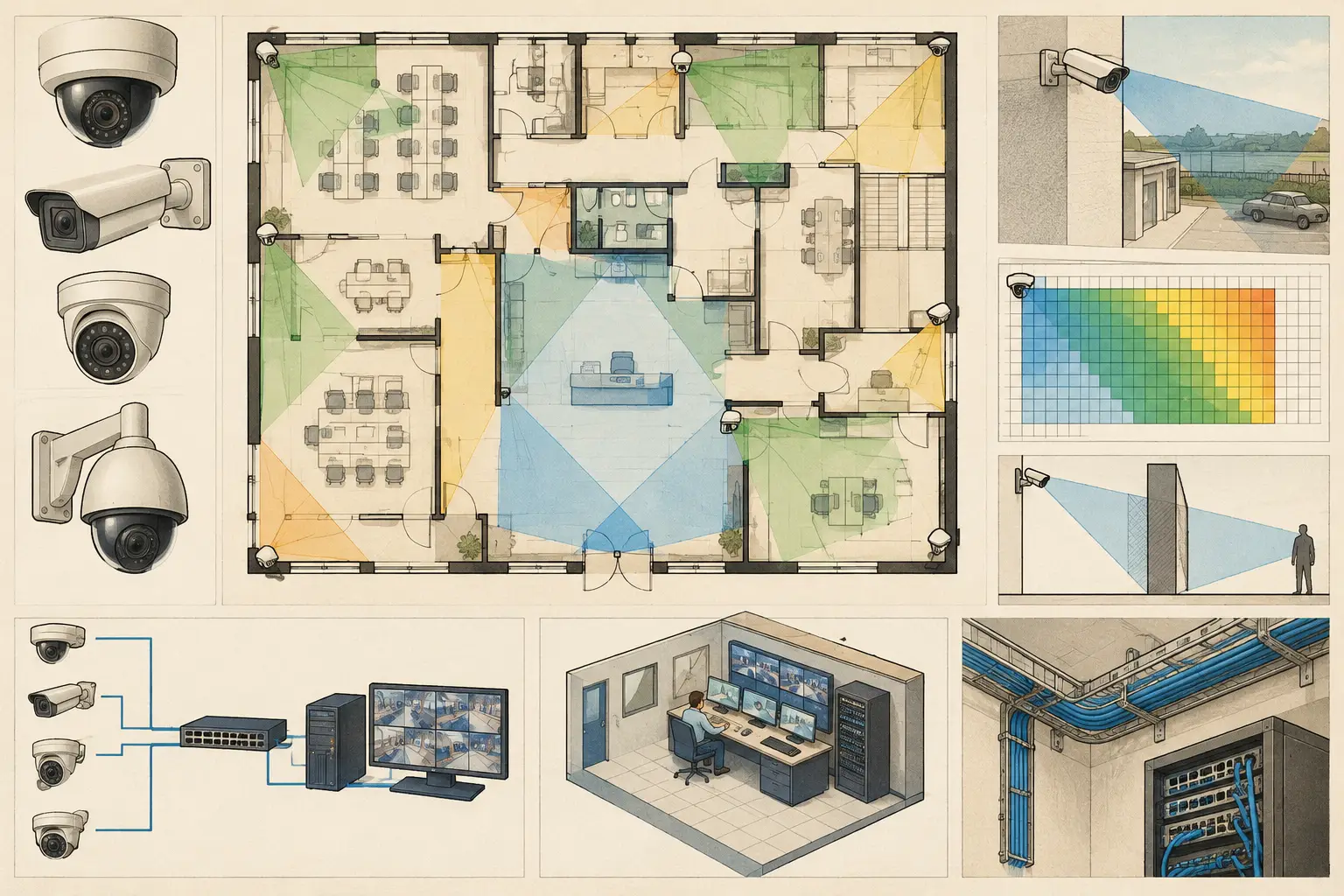
A camera cone drawn over a floor plan is not yet a CCTV design. It may communicate intent, but it does not establish whether a target is visible at the required pixel density, whether a wall blocks the view, or whether the proposed network can support the camera schedule. Effective camera layout tools turn a plan into an engineering workspace where physical geometry, optical inputs, coverage criteria, and documentation can be reviewed together.
For consultants, integrators, architects, and enterprise security teams, the value is traceability. A reviewer should be able to see why a camera was placed in a location, what it is expected to observe, which assumptions were used, and where the design still requires coordination or site verification.
What Camera Layout Tools Need to Model
The starting point is a usable drawing. A platform should support the import of architectural floor plans, site plans, or elevations and allow scale calibration against a known dimension. If a plan is incorrectly scaled, every downstream result is questionable: mounting distances, field of view dimensions, pixel-density zones, cable routes, and storage estimates may all be affected.
Geometry is equally important. A camera field of view that passes visually through walls, partitions, shafts, racking, or structural columns creates false confidence. Camera layout tools should let the designer review walls and openings as physical constraints, then calculate occlusion based on the camera position, direction, mounting height, tilt, and field of view. This does not remove the need for a site survey, particularly where furniture, signage, vegetation, or changing operational conditions are relevant. It does make blind spots visible earlier, when revisions are less disruptive.
A useful design workspace also treats camera configuration as technical data rather than a generic icon. Resolution, sensor size, focal length, aspect ratio, mounting height, camera direction, and tilt all influence the calculated scene. A 4K camera with an unsuitable lens may provide less useful identification coverage than a lower-resolution camera with an appropriate focal length and placement.
A Practical Workflow for CCTV Layout Design
Import and calibrate the drawing
Start with the current revision of the architectural or civil drawing. Confirm that the imported plan is legible, oriented correctly, and calibrated using a reliable stated dimension. If the source drawing has no dependable dimension, record that limitation rather than treating an estimated scale as verified.
At this stage, establish the project boundaries. Identify the areas to be observed, access routes, entries and exits, transaction points, perimeter lines, loading areas, and any locations where evidence quality is more critical. The output is not a camera count. It is a traceable spatial basis for the design.
Define the observation objective before choosing the lens
Camera locations should follow an observation requirement, not just a desire to cover the maximum area. DORI is a useful framework for separating broad detection coverage from recognition or identification tasks. Pixel density, often expressed as pixels per meter or PPM, provides another way to review the image detail expected at different locations in the scene.
For example, an exterior overview camera may be intended to detect movement along a fence line, while a door camera may need a tighter field of view to support recognition or identification objectives. The exact requirement depends on the operational brief, risk assessment, site conditions, and applicable project requirements. A calculated DORI or PPM result is design evidence, not a guarantee of actual incident footage quality.
Model walls, openings, and relevant obstructions
Review the drawing geometry before finalizing camera angles. Solid walls should block a view. Door openings may allow a view, but whether that view remains useful depends on door position, glazing, access control hardware, and the real site arrangement. In warehouses and industrial facilities, shelving and machinery can be as significant as architectural walls. In outdoor layouts, landscape growth, parked vehicles, and seasonal lighting conditions may alter the final result.
This is where two-dimensional placement alone becomes insufficient. The designer needs to consider mounting height and tilt alongside the plan view. A camera mounted high above a corridor can cover a larger footprint but may produce poor facial detail at a doorway. A lower mounting position may improve pixel density at the target while increasing the chance of occlusion or tampering. There is no universal best height; the trade-off must be tested against the required scene.
Configure the camera from known parameters
Enter camera parameters from the intended specification or a verified manufacturer datasheet. At minimum, use the correct resolution, sensor size, focal length or lens range, mounting height, direction, and tilt. For varifocal cameras, test the selected focal length rather than leaving the design at a broad default setting.
The field of view should be reviewed in context. A very wide view can appear attractive on a layout because it colors a large area, yet the same choice can reduce PPM at the far end of the scene. A longer focal length can improve target detail but narrows the viewing angle and may create adjacent blind spots. The objective is not maximum colored coverage. It is suitable coverage for the documented operational requirement.
Review coverage gaps and unnecessary overlap
Once cameras are placed, inspect coverage across the full plan. Look for blind spots at corners, behind partitions, at approach paths, and near critical doors. Then review overlapping coverage. Some overlap is intentional and useful, such as at entrances, intersections, and handoff zones between cameras. Excessive overlap can indicate an inefficient layout, especially when several cameras provide similar views while another area has no meaningful coverage.
Coverage layers are most useful when the reviewer can distinguish between field of view, occluded areas, and pixel-density or DORI zones. That separation helps teams avoid a common error: assuming that an area inside a viewing cone is automatically suitable for a specific identification task.
Coordinate network planning while the layout is still live
Camera placement affects more than image coverage. It drives cable routes, PoE switch locations, uplink capacity, cabinet space, and the likely network topology. A camera layout should therefore support early coordination with ICT and electrical disciplines rather than being handed over as a final visual drawing.
The design should identify logical camera groups, likely connection points, and backbone paths. Bandwidth and storage calculations require additional assumptions such as codec, frame rate, scene activity, retention period, and recording configuration. These values should be documented as design inputs and checked against the final selected equipment. They are not fixed simply because a camera resolution has been chosen.
Deliverables That Make Review Easier
A good layout becomes more valuable when it produces a consistent technical deliverable. Camera identifiers should align across the floor plan, camera schedule, coverage views, and network documentation. Each camera entry should make its key assumptions visible, including location, mounting height, direction, focal length, resolution, and intended coverage purpose.
Professional reports also need to communicate uncertainty. A note may identify areas requiring a site survey, ceiling coordination, final lens verification, or confirmation of proposed containment routes. This is more useful than presenting a polished drawing as if all physical and operational conditions had already been verified.
CCTV Design Tool Online is built around this connected workflow: calibrated drawings, editable physical geometry, camera parameters, field-of-view analysis, DORI and pixel-density review, network planning, and structured reporting in one persistent browser-based workspace. The approach remains brand-agnostic, allowing teams to work from technical camera parameters before final manufacturer selection.
How to Evaluate Camera Layout Tools
When assessing a platform, begin with the design questions it can answer. Can it calibrate plans accurately? Can walls and openings influence camera visibility? Can the user set focal length, sensor size, mounting height, and tilt? Can the workspace display DORI or PPM results rather than only generic cones? Can camera data remain synchronized with the schedule and report?
The answer depends on the project. A small tenant fit-out may need a fast, reviewable coverage layout. A campus, transport facility, or multi-building development may require disciplined naming, repeated revisions, network coordination, and reports suitable for multiple stakeholders. In both cases, a tool should reduce disconnected work without obscuring the engineering assumptions behind the result.
Automation can accelerate wall tracing, placement suggestions, and documentation, but it should not replace verified geometry or professional review. Architectural drawings may be incomplete, site conditions may have changed, and manufacturer-specific camera behavior may differ from high-level design inputs. Treat automated outputs as a starting point for review, not as final proof of installation performance.
The most useful layout is one another engineer can interrogate. If the drawing shows the physical constraints, the optical choices, the required image detail, and the outstanding assumptions, it gives the project team a practical basis for better decisions before equipment reaches the site.