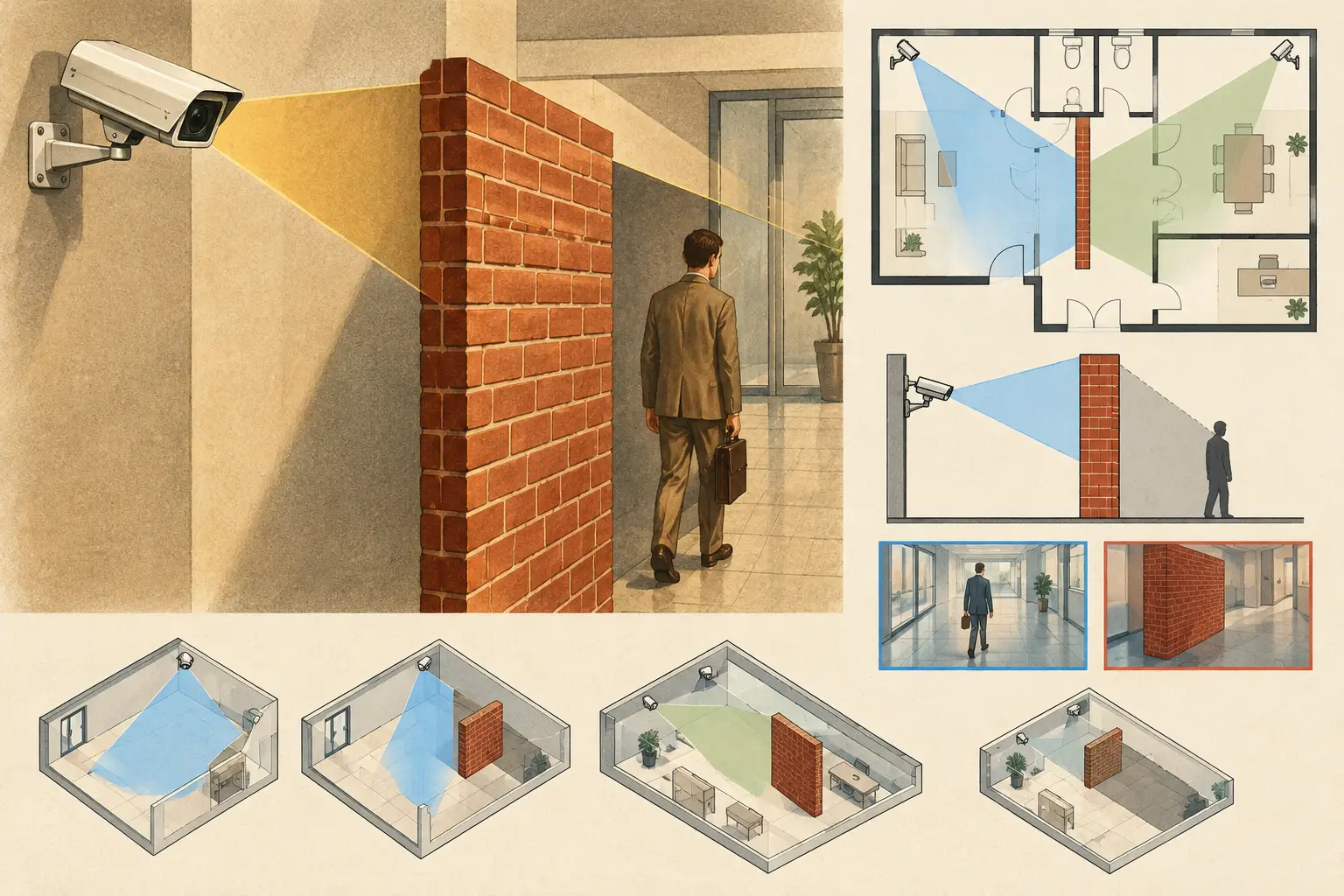
A camera can have an apparently generous field of view on a floor plan and still provide no usable coverage beyond a partition. So, can walls block cameras? For conventional visible-light CCTV cameras, yes: an opaque wall blocks the camera's line of sight. The practical design issue is not whether the wall exists, but whether the design model represents its position, thickness, height, material, and openings accurately enough to reveal the resulting occlusion.
A field-of-view cone drawn across walls is not evidence of coverage. It is only an optical projection until physical geometry is applied. Security designers should treat walls, columns, doors, glazing, racking, ceilings, and other obstructions as design inputs that can change the usable scene, pixel density, and DORI outcome.
Can Walls Block Cameras in a CCTV Design?
A standard fixed, PTZ, or varifocal CCTV camera records light that reaches its image sensor through the lens. A solid masonry wall, concrete partition, metal panel, or opaque internal stud wall prevents light from objects on the other side from reaching the camera. The camera cannot identify, observe, or detect activity through that wall simply because its calculated field of view extends beyond it.
This distinction matters most in 2D planning. A camera placed at the end of a corridor may have a calculated horizontal field of view that spreads into adjoining rooms when walls are not modeled. In the installed environment, those rooms remain outside the camera's view except through doors, internal windows, or other openings. The unmodeled portions of the cone are blind spots, not coverage.
Wall geometry also changes the scene on the camera side of the partition. A camera mounted close to a corner can lose a substantial part of its near field behind the wall edge. Depending on focal length, mounting height, tilt, and orientation, the camera may see the far end of a corridor while missing the area immediately around the doorway or turn.
What Actually Blocks a Camera View?
Not every boundary on an architectural drawing has the same optical behavior. The designer needs to interpret each object according to its actual physical condition at camera height.
Opaque walls and full-height partitions generally create complete line-of-sight occlusion. Their thickness matters near corners, returns, and door reveals. Modeling a thick concrete wall as a single thin line may overstate visibility around an edge, particularly where a camera is positioned close to the structure.
Low partitions may block a camera installed at desk height but not a camera mounted at 10 feet. Conversely, a suspended ceiling bulkhead may obstruct a high-mounted camera while the same view remains open at a lower mounting height. Wall height should therefore be reviewed against the proposed camera elevation, not only as a 2D symbol.
Columns, elevator cores, service risers, shelving, and equipment enclosures deserve the same treatment. They may be smaller than a wall but can create meaningful dead zones in lobbies, loading areas, data rooms, and parking structures. In a narrow passage, a single column can interrupt identification-level coverage at the point where it is required.
Doors and openings are conditional viewing paths. An open doorway provides a line of sight, but a closed opaque door does not. If operational coverage depends on seeing through a door, the design should state the assumed door position and consider whether that assumption is reliable during the relevant security scenario.
Glass Is Not the Same as an Open View
Glass may allow a camera to see into an adjacent space, but it introduces different performance constraints. Clear internal glazing can preserve a line of sight in daylight or well-controlled lighting. Reflections, glare, tinting, decals, blinds, dirt, and changes in interior illumination can reduce usable image detail.
Infrared illumination is a common problem. A camera installed behind glass may produce a strong reflection from its own IR LEDs, making the scene beyond the pane partially or completely unusable at night. The issue is not that the glass acts like an opaque wall. It is that reflected light can dominate the image sensor.
External windows also create exposure challenges. A camera facing from a darker interior toward a bright exterior may record silhouettes rather than facial detail unless the camera's dynamic range, exposure settings, scene lighting, and installation angle are evaluated. Pixel density on the drawing remains a geometric calculation; it does not by itself verify image quality under difficult lighting conditions.
Wall Occlusion Changes DORI and Pixel Density
DORI planning evaluates whether the pixel density at a target area supports detection, observation, recognition, or identification objectives. PPM, or pixels per meter, is similarly useful for measuring available image detail across a defined scene width. Both measures depend on the part of the scene that is actually visible.
Suppose a camera provides sufficient calculated PPM at a door located 60 feet away. If a wall corner blocks half of that doorway, the result is not partial compliance with the intended DORI objective. The hidden portion has no image data from that camera. A second camera, a revised mounting position, a different focal length, or a change to the operational objective may be necessary.
Occlusion can also create misleading overlap. Two cameras may appear to cover the same zone on a plan, yet one view may be blocked by a partition and the other may be backlit or angled poorly for the target. Coverage overlap has value when it is intentional and when each camera contributes a usable perspective, appropriate pixel density, and a defined security purpose.
Model Walls Before Finalizing Camera Placement
The most reliable workflow starts with a calibrated drawing. Import the current floor plan, verify its scale against a known dimension, then define walls and other fixed physical geometry before treating camera placement as final. A scale calibration error can shift every camera range, field of view, and PPM calculation, while missing geometry can create false coverage.
For each camera, establish the technical inputs: sensor size, resolution, focal length or lens range, mounting height, direction, tilt, and the required DORI or pixel-density target. Then review the visible footprint after walls and obstructions have been applied. The question is not merely whether the camera sees a large area, but whether it sees the right area at the required level of detail.
At corners and intersections, inspect the near-field blind spot. At doors, inspect both the approach path and the threshold. In open-plan spaces, account for likely future furniture, racking, or partitions where the building use makes those changes foreseeable. A design drawing cannot predict every temporary obstruction, but it should identify assumptions that affect coverage.
CCTV Design Tool Online supports this workflow by allowing designers to calibrate plans, create or review wall geometry, position cameras, and assess field of view, occlusion, DORI, and pixel-density coverage within one design workspace. The output remains a calculated design result. Camera datasheets, site conditions, lighting, installation tolerances, and commissioning tests must still be reviewed by qualified project personnel.
Common Design Errors Around Walls
The most frequent error is treating a camera cone as if it passes through architectural elements. This often happens when cameras are positioned before walls are drawn, or when a plan is simplified for presentation and the simplified version becomes the working design.
Another error is assuming a wall stops only the far-field view. In reality, the wall return can create a near-field occlusion that affects entrances, escape routes, reception counters, or cash-handling approaches. This is especially relevant for wide-angle lenses. A wider lens expands the overall field of view but does not see around solid corners, and it may reduce pixel density at more distant targets.
A third error is relying on camera rotation instead of revising placement. Turning the camera away from a wall may recover some visible area, but it can compromise a required DORI target elsewhere. A design change should be evaluated across the entire camera view, not only at the newly exposed blind spot.
Finally, do not confuse visual coverage with network feasibility. A camera may have an appropriate view but still require a viable cable route, PoE budget, switch port allocation, storage calculation, and network topology. Walls can influence containment routes and construction coordination even where they do not directly affect the camera's optical view.
Verify the Model in the Real Space
A disciplined design review uses the plan to identify likely issues before installation, then uses site verification to confirm critical views. Compare finished wall locations, ceiling levels, door swings, glazing, furnishings, and lighting conditions against the design assumptions. Confirm the installed camera's actual focal length, height, direction, and tilt rather than assuming the installer can reproduce the drawing exactly.
Where a view supports a high-risk operational requirement, test it under representative lighting and activity conditions. Review whether the target remains visible when doors are closed, whether reflections affect glazing, and whether the recorded image meets the project's intended DORI objective. Regulatory and authority requirements, where applicable, should be verified separately for the specific jurisdiction and project.
Walls do block cameras, but the more useful design question is where each wall changes the usable image. When geometry, optics, pixel density, and installation conditions are reviewed together, blind spots become a design decision to resolve rather than a surprise discovered after commissioning.