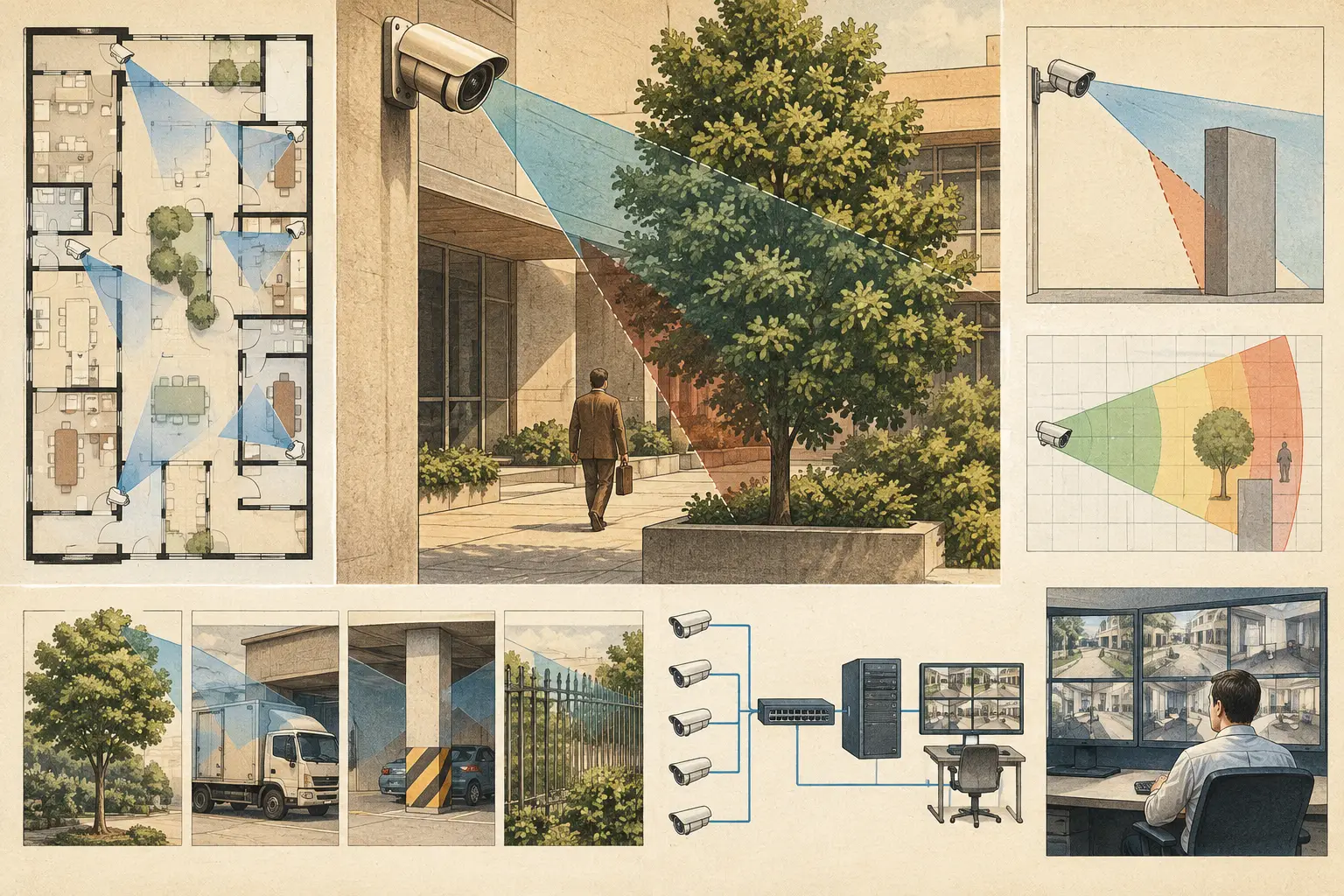
A camera can be correctly selected, mounted at the planned height, and pointed toward the intended scene, yet still fail the operational objective because part of its view is blocked. CCTV obstruction causes are not limited to permanent walls. They include architectural features, furniture, stock, vehicles, vegetation, lighting conditions, and changes that occur after handover. A credible design must test what the camera can actually see, not simply draw a field-of-view cone across a floor plan.
Why obstruction analysis changes camera design
A camera's horizontal field of view is a geometric calculation based on sensor size, focal length, mounting height, direction, and tilt. That calculation defines the theoretical scene area. Obstruction analysis determines which part of that theoretical area remains visible from the camera position.
This distinction matters because pixel density is only useful where there is an unobstructed line of sight. A design may show sufficient PPM at a doorway, cashier point, or perimeter gate, but a column, ceiling bulkhead, parked vehicle, or display fixture can conceal the target zone. The result is a blind spot that may not be obvious in a conventional 2D coverage drawing.
Occlusion also affects camera redundancy. Two cameras can appear to overlap on plan, while both views are blocked by the same physical element. Conversely, a second camera positioned from a different angle may provide meaningful coverage overlap, even if its nominal cone appears smaller. The engineering question is not only, "How much area is covered?" It is, "Which operational targets remain visible, at what pixel density, and from how many independent viewpoints?"
Common CCTV obstruction causes
Fixed building geometry
Walls are the most obvious obstruction, but they are not the only fixed elements that need to be modeled. Structural columns, beams, soffits, elevator cores, stair enclosures, service risers, parapets, fencing, gates, and roof equipment can all interrupt a camera's line of sight.
A common coordination issue occurs when security layouts are prepared before architectural details are finalized. A camera shown at a corridor intersection may later face a new partition wall, an access-control vestibule, or a fire-rated door held open during normal operation. The camera schedule may remain unchanged while the installed view is materially different from the approved drawing.
Door and window openings require their own review. An opening may create a useful sightline, but its usable condition depends on door position, frame depth, blinds, signage, reflective glazing, and the direction of travel. Do not treat every opening in a plan as permanently clear.
Interior fit-out and operational objects
Retail shelving, warehouse racking, storage cages, display units, lockers, office partitions, and large machinery often create the most significant indoor occlusions. Unlike a wall, these objects may be omitted from an early floor plan or changed by the end user without a security design review.
Mounting a camera higher can see over some obstructions, but this is not a universal correction. Greater mounting height can increase the visible floor area while reducing facial detail at the far end of the scene. It may also create unfavorable viewing angles for targets close to the camera. The appropriate response depends on the required DORI task and the expected height of the obstruction.
Operational movement matters as well. Pallets, delivery carts, temporary displays, queues, and parked equipment can block a view that is clear during commissioning. In loading areas and logistics facilities, assess the scene under normal peak operating conditions rather than in an empty space.
External features and changing site conditions
Outdoor cameras are exposed to obstruction causes that evolve over time. Trees and shrubs grow into a camera's field of view. Seasonal foliage changes the level of blockage. Construction hoarding, waste containers, parked trucks, advertising signs, and temporary event infrastructure can create unplanned blind spots.
Vehicle movement deserves particular attention at entrances, loading docks, and parking areas. A camera aimed across a driveway may have an adequate view of a pedestrian route when no vehicle is present, but lose the route whenever a van stops at the curb. If identifying people on that route is a project requirement, a second viewing angle may be more effective than widening the first camera's field of view.
Camera hardware and installation details
Not every obstruction is in the environment. Domes can suffer from internal reflections, contamination, or housing components intruding into the image. Incorrect mounting adapters can alter the planned tilt or prevent the camera from reaching its specified angle. Nearby conduit, junction boxes, signs, and sunshades may enter the image after installation.
Camera selection also creates practical limitations. A wide-angle lens may capture more scene context but make distant targets smaller. A longer focal length may provide the required pixel density at a gate or door but narrow the field of view and make precise aiming more critical. No single lens setting resolves every occlusion problem.
Visibility loss that behaves like an obstruction
Some conditions do not physically block the camera, but they remove usable image detail in the same way. Backlight from glazing, glare from vehicle headlights, low sun, reflections from polished floors, rain on a housing window, fog, and dirty lenses can obscure target information.
These conditions should not be confused with a geometric blind spot. A line-of-sight model can identify whether a wall or object blocks the view. It cannot by itself verify exposure, dynamic range, infrared performance, motion blur, or manufacturer-specific image processing. These require camera specification review and, where appropriate, site testing under representative lighting conditions.
A disciplined method for reviewing obstructions
Start by importing and scale-calibrating the latest available drawing. A field-of-view calculation is only as reliable as the plan scale, camera location, and physical geometry used to create it. Confirm dimensions against controlled architectural information or site measurements where the project process requires it.
Next, model walls and major fixed geometry with particular care around corridors, doors, counters, gates, and changes in level. Representing a wall as a visual line is not enough if the design tool does not use that geometry to stop the camera's line of sight. The coverage result must account for occlusion rather than allowing the cone to pass through solid construction.
Then place cameras using the intended mounting height, direction, tilt, sensor size, resolution, and focal length. Review the visible area and the calculated pixel density together. A camera may see around an obstruction but no longer provide the PPM needed for recognition or identification at the target point.
For critical targets, review views from multiple directions. This is especially relevant for entrances, reception desks, transaction points, perimeter crossings, and high-value storage. A second camera should have a defined purpose: covering the hidden side of an object, preserving target visibility during a predictable blockage, or providing a corroborating viewpoint. Adding cameras without a coverage objective can increase cost and network load without resolving the actual risk.
Finally, check the design against expected operational states. Ask how doors are normally positioned, where stock accumulates, where vehicles wait, and what temporary structures appear during maintenance or events. This step often reveals that the most effective correction is not a camera change. It may be relocating a rack, setting a clear-zone requirement, or coordinating a camera mount before the ceiling and services are complete.
Corrective options and their trade-offs
Repositioning the camera is often the first option because it can restore line of sight without adding equipment. However, moving it may reduce coverage of another area, create a more difficult cable route, or place it outside a practical mounting surface.
Changing mounting height or tilt can help clear a partial obstruction. Review the impact on face angle, near-field coverage, and pixel density before accepting this adjustment. A higher viewpoint may be suitable for situational awareness but unsuitable where the design requirement calls for usable identification detail.
A different focal length can narrow the scene and concentrate pixels on a target, while a wider lens can recover context around an obstruction. Both choices involve a trade-off between scene width and target detail. Use verified camera parameters rather than generic assumptions about lens performance.
Where the obstruction is unavoidable, use a second camera from a genuinely different angle. This is usually more defensible than expecting one camera to observe around corners, through shelving, or past a vehicle that routinely stops in front of the view. Review the resulting network topology, power provision, recording capacity, and camera schedule as part of the same change.
CCTV Design Tool Online supports this workflow by allowing designers to calibrate plans, represent physical geometry, position cameras, review occluded fields of view, check DORI and pixel-density coverage, and produce a structured design deliverable. The calculated output remains a design aid. Installation conditions, final camera settings, lighting, and site changes still require qualified review.
Record the decision, not just the camera position
A drawing should make it clear why a camera is located where it is. Record the protected target, required DORI objective, mounting height, orientation, focal length, expected obstruction risk, and any dependency on furniture layouts or clear zones. This gives installers and reviewers a basis for checking whether the site still matches the design intent.
For complex sites, include annotated views of critical blind spots and the camera that mitigates each one. This is more useful than presenting a dense set of cones with no explanation of what has been verified. It also makes later revisions traceable when architecture, operations, or tenant fit-out changes.
The practical goal is not to eliminate every shadowed area on a plan. It is to identify the blind spots that matter, confirm whether they affect a defined security objective, and make the design response visible before installation work makes correction more expensive.