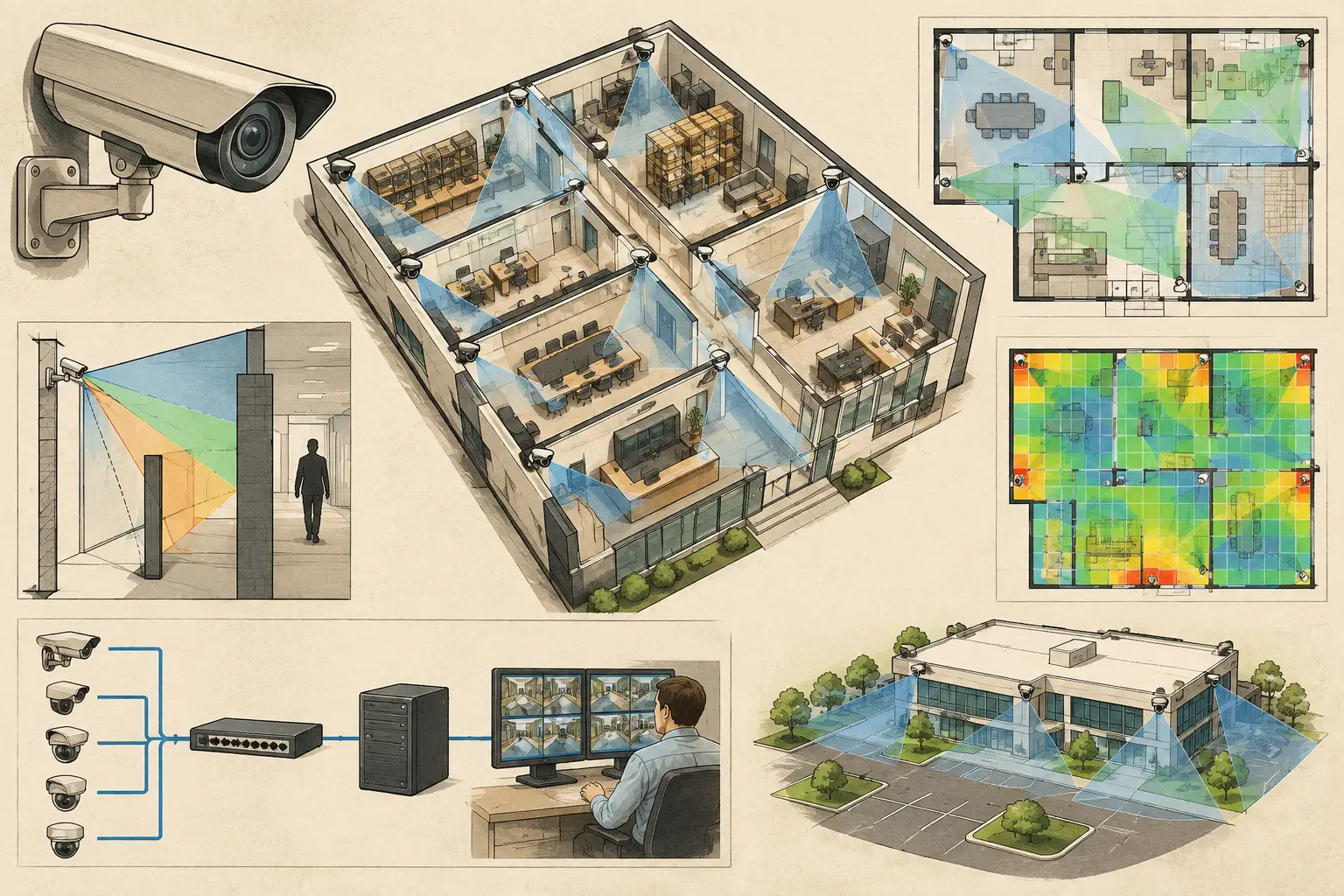
A camera cone drawn across an open floor plan can look convincing while concealing a fundamental problem: the camera cannot see through a partition, storage rack, reception desk, or structural column. CCTV wall modeling turns the drawing into a spatial design model, allowing the proposed field of view to respond to physical obstructions rather than treating the site as empty space.
For consultants, integrators, and project teams, this matters well before installation. It provides a traceable way to test whether a camera position supports the intended observation task, where blind spots begin, and whether a change in wall layout requires a design revision.
What CCTV Wall Modeling Represents
CCTV wall modeling is the process of defining walls and related physical geometry within a security design workspace. At a minimum, the model establishes where a wall begins and ends. In a more useful design workflow, it also captures wall thickness, height, openings, and the relationship between walls and the calibrated floor plan.
The objective is not to recreate every architectural detail. It is to include the geometry that affects sightlines, camera mounting feasibility, and coverage interpretation. A full-height masonry wall, for example, should block a camera's field of view. A low counter, glass partition, open doorway, or turnstile may require a different representation because its effect on visibility depends on its height, material, and viewing angle.
This distinction is why a camera coverage diagram without wall-aware geometry should be treated as an initial concept, not a complete design verification. A calculated field of view describes where the lens is directed. The visible area is reduced by occlusion.
Start With a Calibrated Drawing
Wall geometry is only as reliable as the drawing beneath it. Import the latest available floor plan, then perform scale calibration using a known and verified dimension. This may be a labeled grid line, a measured corridor length, or another dimension confirmed against the project information.
Scale calibration affects every downstream result. If the plan is incorrectly scaled, wall lengths, camera-to-target distances, field-of-view width, pixel density, and DORI zones can all be misleading. A camera may appear to meet a required PPM threshold on screen while the actual target distance is materially different.
Before modeling walls, review the drawing for coordination issues. Architectural backgrounds may include demolished partitions, furniture plans may differ from the construction plan, and scanned drawings can be distorted. Where information is incomplete, record the assumption and request clarification rather than treating an uncertain line as verified construction geometry.
Build Geometry That Affects Sightlines
A practical model usually starts with the perimeter, internal partitions, corridors, and controlled-access boundaries. Then add features that could create meaningful blind spots or alter a camera's line of sight. The appropriate level of detail depends on the design stage and the operational objective.
For an early feasibility study, full-height walls and major room divisions may be enough to test camera zones and rough device quantities. For detailed design, include openings, service counters, columns, fixed shelving, plant rooms, and other permanent obstructions where they affect the surveillance requirement.
Set wall height, not just wall location
A two-dimensional line cannot determine whether a camera mounted at 10 feet can see over a 7-foot partition. Wall height is therefore a critical input when the platform supports three-dimensional or elevation-aware analysis. Combine it with camera mounting height, tilt, direction, sensor size, focal length, and target distance to assess the actual viewing condition.
This is particularly relevant in offices with glazed partitions, warehouses with rack aisles, retail sites with display fixtures, and transportation environments with gates or barriers. A wall may fully block an eye-level view but leave an elevated camera with a partial view of the area behind it. That partial view still needs engineering judgment: seeing the top of a person or the edge of an object may not satisfy an identification or recognition objective.
Model openings deliberately
Doors, windows, and open pass-throughs are not minor drafting details. An opening can create a useful sightline through a corridor, but it can also produce misleading coverage if the door is normally closed. Design teams should define the operational condition being assessed: door open, door closed, or both.
Glass requires similar care. Transparent glass may permit a line of sight, but reflections, lighting contrast, tinting, privacy film, and camera angle can materially affect field performance. Treat the modeled result as a geometrical visibility assessment, then confirm image usability through site conditions and verified camera specifications.
Test Coverage After Wall Modeling
Once wall geometry is in place, position cameras and review their field of view against the intended surveillance tasks. The workflow should connect optical inputs to the built environment rather than reviewing each in isolation.
Start with the camera's purpose. A loading dock overview, an entrance identification point, and a cash-handling area need different framing and pixel-density targets. Configure the camera resolution, sensor size, focal length, mounting height, direction, and tilt. Then review calculated coverage and DORI or PPM outputs at the actual target areas.
Walls make this review more meaningful because they reveal where coverage is physically interrupted. A camera may cover most of a lobby while leaving the area immediately behind a feature wall unobserved. A corridor camera may lose sight of a door because its view is blocked by a return wall. These are not necessarily design failures. They are decisions that must be visible to the security, architectural, and operational stakeholders.
Look for coverage overlap with a purpose
Overlap is useful when it supports continuity, alternate viewpoints, or critical target coverage. It becomes wasteful when two cameras duplicate a broad area without improving the required task. Wall-aware modeling helps distinguish between apparent overlap on a plan and genuine overlap in visible space.
Review coverage at transitions such as entrances, corridor turns, elevator lobbies, access-controlled doors, and loading areas. These locations often combine high operational value with complex occlusion. Where one camera is blocked from an approach path, a second viewpoint may be justified. Where a wall eliminates visibility into a zone, changing focal length alone may not solve the problem. Relocating the camera, adjusting mounting height, or adding a device may be more appropriate.
Avoid Common Modeling Errors
The most damaging errors are often simple coordination failures. Use this short control check before treating the design as ready for review:
- Confirm that scale calibration uses a reliable, current dimension.
- Separate full-height walls from low partitions and furniture that may change.
- Verify camera mounting heights against reflected ceiling plans, structure, and access constraints.
- Review doors, glazing, racks, columns, and other obstructions at critical target areas.
- Document assumptions where architectural geometry or operational conditions remain unconfirmed.
A related issue is over-modeling. Capturing every chair, loose cabinet, and temporary item can consume time without strengthening the design. Model fixed or operationally significant obstructions first. Temporary conditions can be addressed through installation coordination, commissioning tests, and site-specific procedures where relevant.
Connect Wall Geometry to the Deliverable
The value of wall modeling increases when it remains connected to the camera schedule, coverage calculations, and technical report. A reviewer should be able to see why a camera is located where it is, what area it is intended to cover, what walls limit that view, and which assumptions influenced the result.
In CCTV Design Tool Online, wall geometry can sit within the same persistent workspace as calibrated plans, camera specifications, field-of-view visualization, DORI analysis, blind-spot review, and network topology. This reduces the risk of a camera schedule changing in one file while an annotated plan or report remains outdated in another.
The resulting drawings and reports are engineering deliverables, not a substitute for qualified review, site verification, or jurisdiction-specific requirements. Calculated visibility and pixel-density results depend on the accuracy of the plan, modeled geometry, camera inputs, and stated assumptions. Actual performance can also be affected by lighting, installation tolerances, scene contrast, compression, camera configuration, and maintenance.
Treat Walls as Design Inputs, Not Background Lines
Security design is often reviewed through camera symbols and coverage cones, but the walls between those cones determine whether the design works as intended. Modeling them early gives architects, security teams, ICT coordinators, and installers a common reference point before cable routes are finalized and devices are mounted.
The useful question is not simply whether a camera points toward an area. It is whether the modeled geometry, optical configuration, and required pixel density support a meaningful view of the target. Answer that question on the drawing, then carry the assumptions forward to site verification.