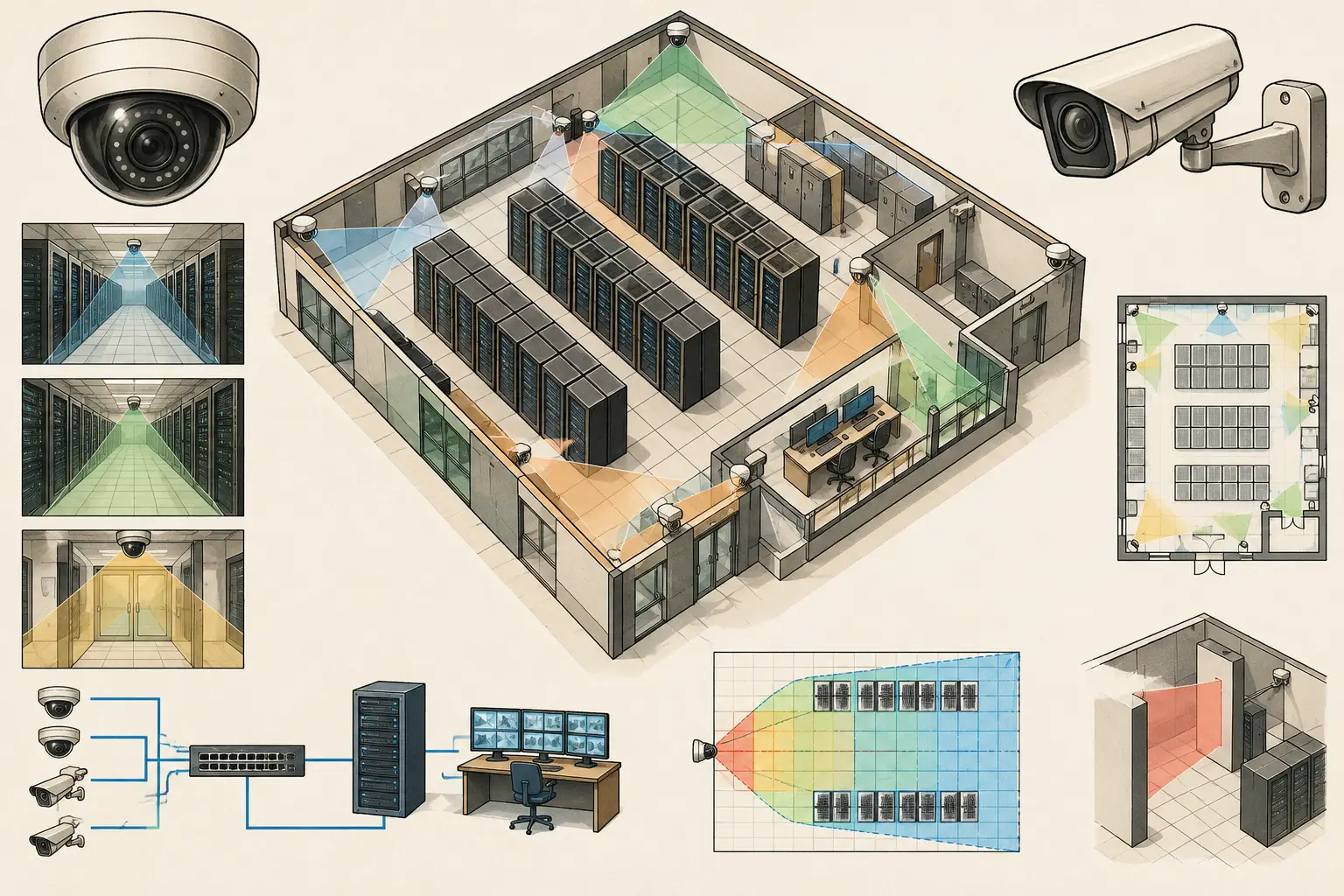
A useful datacenter surveillance example starts with the areas where operational risk, access control, and technical constraints meet. A camera overlooking a server-room doorway may appear correctly placed on a floor plan, yet fail to identify a person because of backlighting, insufficient pixel density, an unmodeled door swing, or an unsuitable focal length. In a data center, coverage must be engineered around specific security objectives rather than drawn as a collection of generic camera cones.
This practical example shows how a security designer can develop a traceable CCTV concept for a medium-sized colocation or enterprise data center. The same workflow can be adapted for edge facilities, campus data halls, and larger critical-infrastructure environments.
Define the surveillance objective before placing cameras
Start by dividing the site into functional security zones. A typical data center may include a perimeter and gatehouse, vehicle approach, loading area, reception, visitor processing area, mantrap, security operations room, data halls, meet-me rooms, electrical rooms, generator compound, and external plant areas.
Each zone needs a stated observation purpose. For example, a reception overview camera may support detection and monitoring of activity, while a mantrap camera may need identification-level imagery at the point where a credentialed person enters a restricted area. A loading-bay camera may need sufficient detail to review vehicle movements, deliveries, and personnel activity across a wider field of view.
This distinction is where DORI planning becomes useful. Detection, observation, recognition, and identification are different design targets. The required pixel density, expressed in pixels per meter or PPM, must be defined at the relevant target distance. A wide-angle camera that is acceptable for detecting movement across a generator yard is unlikely to provide the same result for identifying a face at a controlled entry point.
Calculated PPM and DORI values are design indicators, not proof of real-world performance. Lighting, compression settings, scene contrast, camera firmware, lens quality, target movement, and installation tolerances all affect the installed result.
Datacenter surveillance example: a layered camera layout
Consider a single-story facility with a public entrance at the front, a secure loading bay at the side, two data halls in the center, and electrical and mechanical plant rooms at the rear. The security objective is to document access and activity at key transitions, observe operational areas, and provide useful incident-review coverage without creating unnecessary camera duplication.
Exterior approach and perimeter
Place overview cameras at vehicle and pedestrian approaches to establish activity context. Their fields of view should cover approach routes, gates, walkways, and building facades without being relied upon for close-range identification across the entire scene.
At the main entrance, add a purpose-positioned camera for people entering the building. Its mounting height, tilt, focal length, and sensor size should be selected for the required PPM at the intended capture zone. Avoid excessive downward tilt where it produces mostly head-top views. Also review strong daylight behind glazed entrances, since a calculated coverage cone does not account for poor exposure control by itself.
Perimeter cameras should be checked against fence lines, landscaping, parked vehicles, site structures, and lighting poles. These can create occlusions that are not visible in a simple two-dimensional layout. If adjacent camera views overlap, make sure the overlap has a purpose, such as maintaining visibility when a truck blocks one view or providing continuity along a pedestrian route.
Loading bay and delivery route
The loading area needs both context and detail. An overview camera can record vehicle position, dock-door activity, and the relationship between personnel and deliveries. A second camera may be justified at the secure transfer point if the project requires a closer view of people, badges, pallets, or door use.
The trade-off is coverage versus detail. Increasing focal length narrows the field of view and may improve pixel density in a target area, but it can remove peripheral context. A design review should show both camera views, their target distances, and the reason each camera exists. This prevents the common mistake of trying to make one wide scene camera perform every task.
Reception, visitor processing, and mantrap
Reception coverage should account for counters, visitor waiting areas, doors, turnstiles, and sightline interruptions caused by partitions or decorative features. A ceiling-mounted wide-angle camera can provide useful overview coverage, while a camera at the mantrap should be designed around the face capture zone rather than the whole lobby.
Review doors in both their open and closed positions. An open door can block a camera view, while a door frame may conceal a person standing at the edge of the scene. The camera field of view should also be tested against mounting height and tilt. A camera mounted too high may create a technically broad coverage area but an operationally weak angle for identity review.
Data halls and equipment aisles
Data halls are not ordinary open rooms. Cabinet rows, containment systems, overhead cable trays, ladder racks, and temporary service equipment can all create blind spots. A camera at the end of a cold aisle may have a long line of sight, but cabinet doors, staff, carts, and containment doors can interrupt the view.
Design each aisle based on its operational purpose. End-of-aisle cameras can provide movement monitoring and access context. Cross-aisle cameras may be needed where entrances, cage boundaries, or critical equipment access points require a better angle. Do not assume that a single camera can observe every cabinet face or person working within an aisle.
For shared or customer cage areas, coordinate the camera layout with physical barriers, access-control points, and the agreed security responsibility model. Camera coverage requirements can differ between common data hall circulation routes and restricted tenant-controlled spaces.
Meet-me rooms, electrical rooms, and plant areas
Meet-me rooms and electrical rooms often contain high-value infrastructure in confined spaces. Their small size can tempt designers to use an ultra-wide lens, but excessive lens width may reduce pixel density at doors, panels, and work positions. In some cases, two targeted cameras create a more reviewable design than one camera with a distorted, overly broad image.
Outside, generator compounds and cooling plant require careful occlusion review. Equipment skids, acoustic enclosures, pipework, and security fencing can obstruct views. Cameras exposed to weather also need an appropriate environmental specification, but the final selection should be verified against the manufacturer datasheet and project conditions.
Build the design from calibrated geometry
Import the architectural or site drawing and perform scale calibration using a reliable known dimension. An incorrect scale affects camera distance calculations, lens selection, field-of-view dimensions, PPM values, and cable-route estimates. A plan that looks visually credible can still be technically unreliable if its scale is wrong.
Next, create or review the walls and physical geometry. Include major obstructions such as equipment rows, doors, partitions, fencing, plant enclosures, and structural columns. Where design information is incomplete, record assumptions rather than treating estimated geometry as verified site conditions.
Set each camera’s technical inputs: resolution, sensor size, focal length, mounting height, tilt, direction, and target pixel-density requirement. Then assess the resulting coverage against the stated objective. The output should show where the target PPM is achieved, where it degrades with distance, and where walls or obstructions produce blind spots.
CCTV Design Tool Online can support this workflow by keeping calibrated drawings, camera specifications, physical geometry, coverage calculations, and report-ready outputs in one design workspace. It remains necessary for qualified designers and installers to verify site conditions, final mounting positions, lighting, and operational performance.
Coordinate network topology early
A data center design should not treat camera placement and network planning as separate exercises. Each camera location needs a practical path to the relevant communications room, cabinet, or network switch. Consider containment routes, separation requirements, available pathways, power delivery, fiber or copper limits, resilience objectives, and maintenance access.
Document the anticipated network topology and camera schedule alongside the coverage design. Useful schedule fields include camera ID, location, mounting type, height, direction, lens setting, resolution, estimated bitrate assumptions, switch or cabinet destination, and the security objective for that view. These records help security, ICT, construction, and operations teams review the same design intent.
Bandwidth and storage estimates should be based on the selected camera configuration and recording policy, then checked against the actual VMS and manufacturer capabilities. Scene activity, codec settings, frame rate, analytics, retention requirements, and recording mode can materially change the final result.
Produce a reviewable deliverable
A professional data center CCTV package should make decisions visible. Include the calibrated plan, camera locations, fields of view, DORI or PPM outputs, blind-spot observations, overlap rationale, camera schedule, and network coordination information. Separate confirmed facts from assumptions and items requiring site verification.
This gives reviewers a basis for constructive questions: Does the mantrap have identification-level coverage at the actual stopping point? Does the loading-bay view remain useful when a delivery vehicle is present? Can the camera cable route be installed without conflicting with the facility’s infrastructure plan?
The value of this datacenter surveillance example is not the number of cameras on the drawing. It is the ability to show why each camera is present, what it is expected to achieve, and what must still be verified before installation.