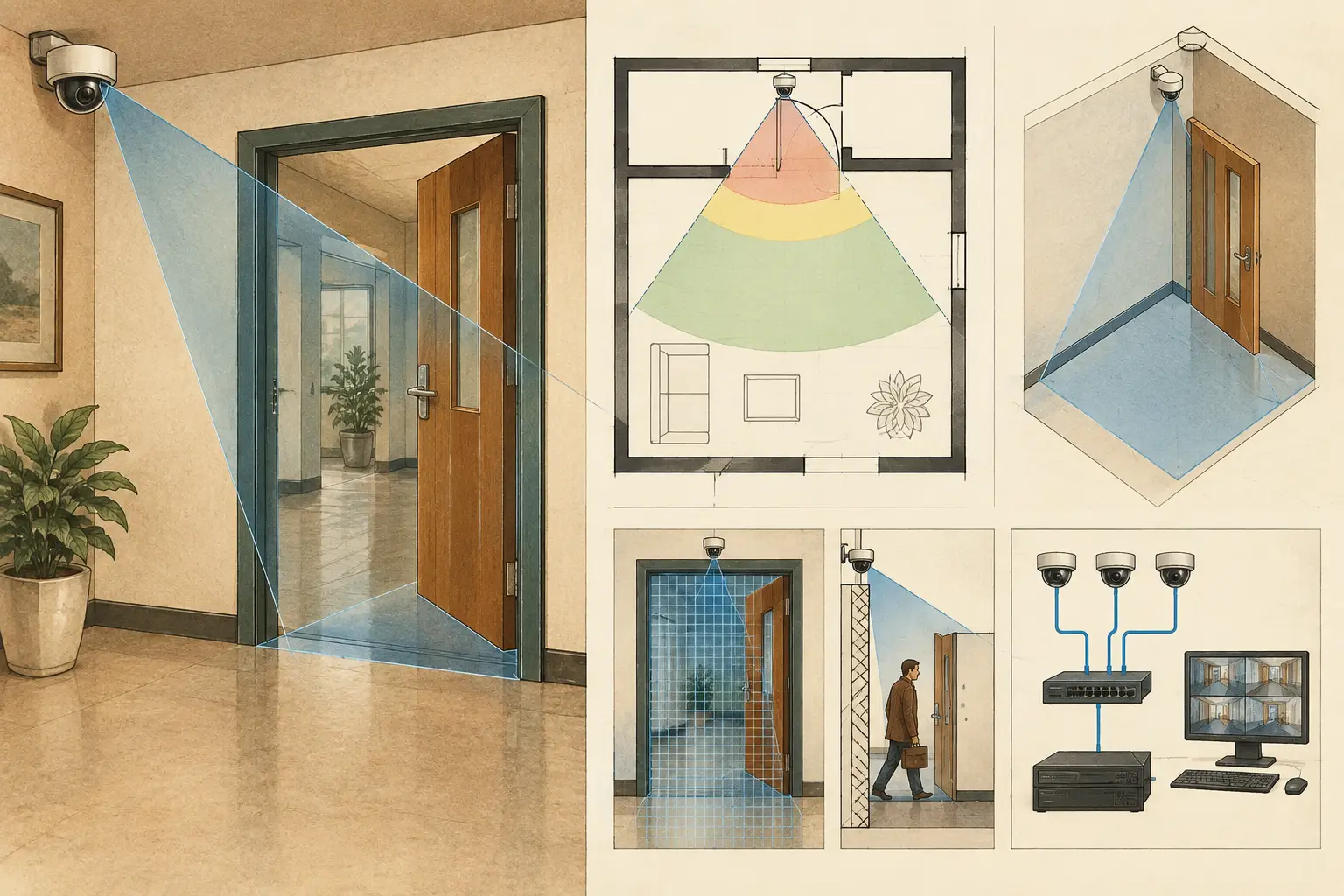
A door is not simply an empty break in a wall. It is a changing physical condition that can create a valid camera sight line when open, an occlusion when closed, and a coverage risk if its geometry is omitted. Knowing how to model door openings correctly allows a CCTV designer to assess the view that a camera can realistically achieve at entrances, corridors, rooms, and controlled-access points.
For security design purposes, the opening, frame, leaf, swing direction, and normal operating position may all matter. A floor plan that treats every doorway as a solid wall can hide useful coverage paths. A plan that treats every doorway as permanently open can overstate coverage. The correct approach depends on the operational use of the door and the objective assigned to the camera.
Why door openings affect CCTV design
Walls define occlusion boundaries. In a camera coverage model, they stop the field of view and create shadows behind them. A door opening changes that boundary, allowing a camera to see through the wall plane when the opening is unobstructed. This can materially affect blind spots, pixel density, coverage overlap, and the number of cameras required.
Consider a camera positioned in a reception area and aimed toward an internal corridor. A modeled opening may show that the camera can observe a section of corridor through an open doorway. However, if the door is normally closed, that sight line is not dependable for a coverage requirement. The model should represent the condition that supports the intended operational claim, rather than the most favorable possible view.
Door geometry also affects documentation. Installers need to understand whether a camera view is intended to pass through an opening, observe people approaching it, or capture activity on one side only. Reviewers need to distinguish calculated coverage from coverage that depends on a door remaining open. These details reduce ambiguity during coordination and installation.
How to model door openings in a calibrated plan
Start with a properly scaled drawing. Import the architectural plan and complete scale calibration before drawing walls or placing cameras. If the scale is wrong, the apparent width of an opening, camera-to-door distance, and resulting pixel density will all be wrong. A door that looks adequate for identification coverage on an uncalibrated plan may be outside the required PPM range after the dimensions are corrected.
Create continuous wall geometry first
Trace or review the wall layout before adding openings. Each wall should follow the actual structural or partition line shown on the latest coordinated drawing. Do not leave a gap merely because the drawing symbol suggests a door unless the physical opening is confirmed.
This distinction matters with glazed doors, fire-rated doors, roller shutters, turnstiles, and access-controlled barriers. A transparent panel may not block a visible-light camera in the same way as a masonry wall, but reflections, privacy films, lighting contrast, and manufacturer-specific camera performance can still affect usable imagery. A closed solid door should generally be treated as an obstruction unless the design purpose is explicitly based on its open position.
Once the wall is continuous, divide it at the opening location or remove the corresponding wall segment. Align the opening with the architectural dimensions where available. The model should represent the clear opening, not just the center mark of the door symbol. For double doors, model the full opening width and consider whether one leaf is routinely fixed closed.
Set the opening width and location from reliable inputs
Use the dimensioned architectural drawing, door schedule, or verified site information to establish the opening width. Avoid estimating from a low-resolution PDF when a dimension is available elsewhere. The width affects the visible angle through the opening and the amount of adjacent space that can be seen from an oblique camera position.
Record the opening location relative to nearby corners, columns, and access-control equipment. A camera may have a clear line through the middle of a doorway while losing the approach route behind a frame return or a perpendicular wall. Small positional errors are particularly significant in narrow corridors and vestibules, where a few inches can alter the visible area.
Represent the door leaf when its position changes coverage
The opening alone is not always enough. If a door leaf swings into the camera's field of view, model or annotate its closed and open condition. This is especially relevant where an inward-opening leaf blocks a camera mounted on the opposite wall, or where an outward-opening leaf masks a person at the threshold.
There are three practical approaches:
- Model the normal closed state when the camera requirement must work regardless of door operation.
- Model the normal open state when the door is routinely held open and that operating condition is verified by the project team.
- Review both states when access control, emergency egress, or workflow causes the door position to vary.
For variable states, do not present the open-door sight line as guaranteed coverage. Instead, document it as conditional visibility and ensure the essential detection, observation, recognition, or identification objective is met in the required operating state.
Position cameras around the actual access sequence
A doorway is usually part of a movement path, not an isolated target. Model the approach side, threshold, and destination side, then define what each camera must achieve. A wide overview camera may detect approach activity, while a second camera may provide recognition or identification at the threshold. Whether both are needed depends on distance, focal length, sensor size, mounting height, scene width, lighting, and the project’s required pixel density.
Avoid assuming that a camera looking through an opening provides reliable face capture. A person passing through a doorway can be backlit, partially obscured by the door leaf, or moving at an angle across the field of view. A camera aimed directly at the controlled passage may produce more useful pixels on the subject than a distant overview camera, even if both show the same location on the plan.
Mounting height and tilt require equal attention. A high camera can see farther through a doorway, but it may produce an unfavorable angle for facial detail at the threshold. A lower mounting position may improve the target angle but introduce tampering risk or interference from people, signage, and furniture. Test the proposed camera position with its actual lens parameters rather than relying on a generic field-of-view cone.
Validate occlusion and DORI on both sides of the opening
After placing the camera, review the field of view against modeled walls and openings. The visible area should terminate at solid geometry and continue only through clear openings. This is where a geometry-aware design workspace is more useful than a static drawing with manually sketched camera cones.
Check pixel density across the areas that matter. A doorway may be visible, yet the target at the far side may fall below the PPM required for the assigned DORI purpose. The camera may provide detection beyond the opening but only observation at the threshold. These are different design outcomes and should be shown clearly in the review output.
Assess the following conditions before accepting the view:
- the approach path on each side of the doorway;
- the threshold and handle or credential presentation area, if applicable;
- blind spots created by frame returns, adjacent walls, or the door leaf;
- overlap with nearby cameras when continuity of observation is required.
Coverage overlap is useful at doors because people often change direction, pause, or interact with access-control equipment there. However, overlap should serve a defined purpose. Adding multiple cameras with nearly identical views can increase recording, network, and storage requirements without resolving the actual blind spot.
Coordinate with architectural and operational information
Door openings are frequently revised late in a project. A door can move because of a fire strategy update, accessibility requirement, tenant change, or access-control coordination. Treat the door schedule and latest floor plan as controlled design inputs, not background reference material.
Where the project involves controlled entry, coordinate camera views with readers, intercoms, locks, turnstiles, reception desks, and escape routes. The security camera should not be positioned on the assumption that a door will remain propped open unless the operational owner confirms that condition. Similarly, a view through an opening should not be used to claim complete coverage of a room when furniture, partitions, or changing occupancy can introduce additional occlusion.
CCTV Design Tool Online can support this workflow by combining calibrated floor plans, walls and openings, camera specifications, field-of-view visualization, DORI analysis, and technical reporting in one persistent design workspace. The resulting calculations are design inputs, not a substitute for site verification, coordinated construction documents, or qualified professional review.
Document assumptions so the design remains traceable
A clear drawing should show the camera position, direction, mounting height, focal length, coverage area, and relevant opening geometry. The accompanying camera schedule or design notes should state any condition that affects the result, such as “coverage through doorway based on door held open during business hours” or “threshold coverage assessed with door closed.”
This level of traceability is valuable when a design is reviewed by architects, integrators, project owners, and ICT teams. It also helps during commissioning, when the installed door swing, furniture layout, or camera mounting point may differ from the design assumption.
A well-modeled doorway makes the design more honest. It shows where a camera can see, where a closed door changes the result, and where another viewpoint may be justified. That is the information a project team needs to make defensible coverage decisions before equipment reaches the site.