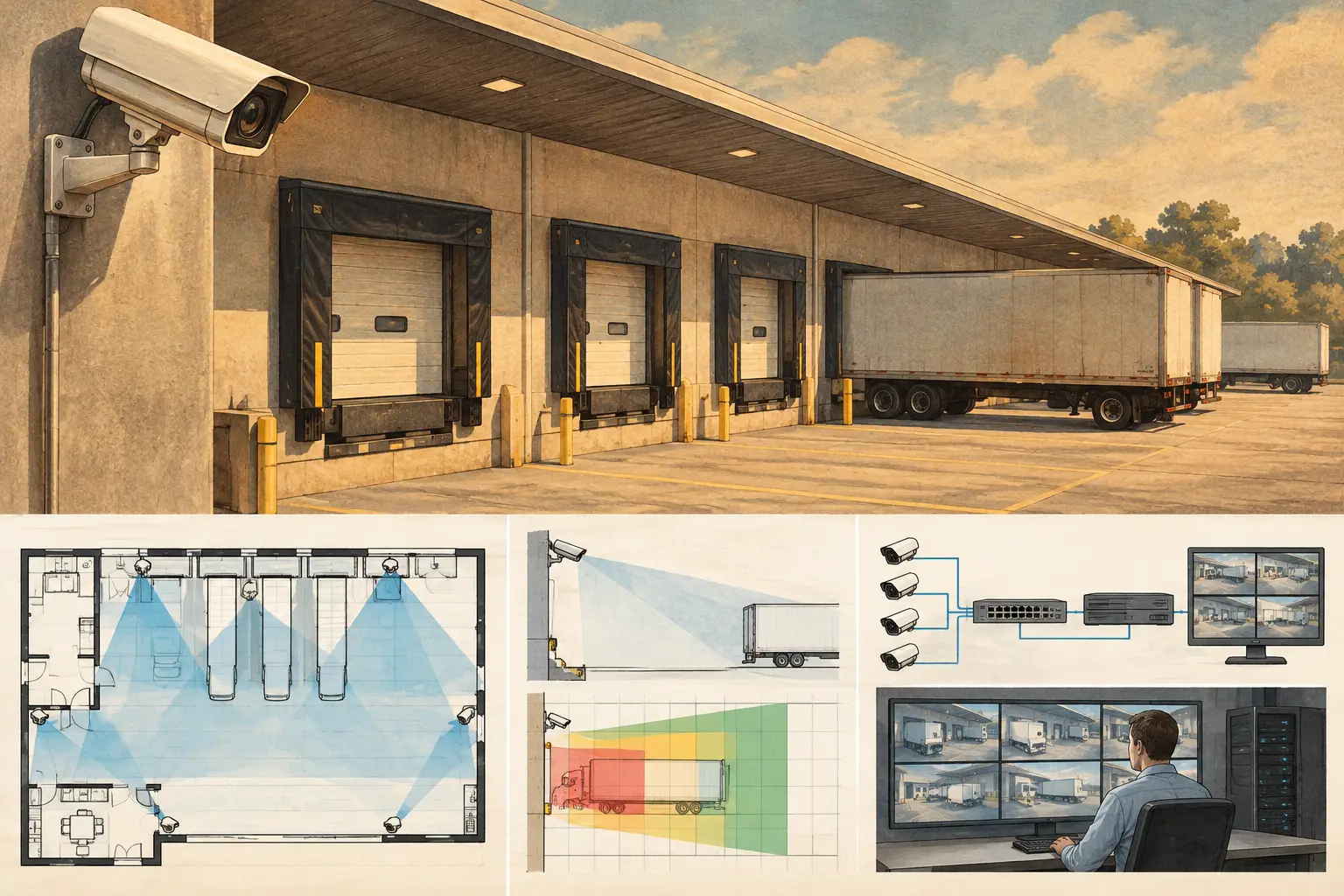
A loading dock changes character throughout the day: trailers reverse into bays, doors open, forklifts cross pedestrian paths, and drivers move through areas that may be shadowed at noon and washed out by headlights after dark. Effective loading dock camera best practices begin by treating this as a sequence of operational events, not as a single wide area that needs a camera icon on a drawing.
The design objective must be defined before selecting a camera. A dock camera intended to observe bay availability has different optical and pixel-density requirements from one intended to support review of vehicle approach, cargo handling, door access, or an incident involving people and equipment. One broad overview may support situational awareness, but it rarely provides sufficient detail for every task.
Start With Dock Operations and Evidence Objectives
Map the dock workflow from vehicle arrival through departure. Identify where a truck approaches, where it aligns with the bay, where personnel enter and leave, where goods transfer, and where a dispute or safety incident is most likely to require video review. This establishes the scenes that need observation and the level of image detail required in each one.
For example, an approach camera may need to show vehicle movement and lane use over a broad field of view. A camera facing the dock face may need to record trailer positioning and door activity. A separate camera inside the loading area may need better pixel density at the threshold, staging zone, or handoff point. Trying to force all three tasks into one view often creates excessive scene width, insufficient detail, or both.
Document the required outcome for every scene in terms that can be reviewed. Use a practical DORI target or a defined pixel density in pixels per foot or pixels per meter, depending on the project standard. Recognition and identification objectives require materially more image detail than general detection. The required performance should be assessed at the relevant target location, not only at the center of the camera cone.
Loading Dock Camera Best Practices Begin With Geometry
A dock plan cannot be engineered reliably until its scale is correct. Import and calibrate the floor plan or site drawing against a verified dimension, then review walls, dock doors, columns, bollards, canopies, racking, trailer positions, and other physical geometry. A visually attractive coverage drawing can still be misleading if the underlying scale is wrong.
Mounting height, direction, tilt, sensor size, resolution, and focal length must be evaluated together. A higher mounting point can reduce tampering risk and improve broad oversight, but it also increases the top-down viewing angle. At steep angles, facial detail, pallet labels, and activity at the dock threshold may be less usable than the apparent coverage area suggests.
Longer focal lengths can provide more pixel density over a constrained target area, such as a specific bay door or a vehicle plate zone. The trade-off is a narrower field of view and greater sensitivity to installation alignment. Wider lenses provide context, but can spread available pixels across a large scene. Camera selection should therefore follow the required field of view and target detail, not a default lens habit.
Model Occlusion, Not Just Coverage Cones
The loading dock is full of temporary and permanent occlusions. A stationary view can be blocked by an open trailer door, a raised dock leveler, a truck body, stacked pallets, parked forklifts, or a person standing close to the camera. Canopies and structural beams can also obstruct the upper portion of the field of view.
Review camera fields of view against modeled walls and physical objects where possible. Then consider operational obstructions that may not be fixed on the drawing. A camera viewing across several bays, for instance, may lose meaningful visibility whenever a trailer is docked. In that case, a camera per bay, paired views from opposing angles, or a dedicated indoor camera may be a better design response than simply increasing resolution.
Coverage overlap is useful at handoff points, entrances, and high-risk transfer zones. It gives investigators a second angle when one camera is obscured or when a subject is backlit. Too much overlap, however, can add cost and network load without improving the required evidence outcome. Specify overlap where it has a defined operational purpose.
Separate Exterior, Threshold, and Interior Views
A practical dock design commonly divides coverage into three related scenes. Exterior cameras observe vehicle approach, maneuvering, and the dock apron. Threshold cameras focus on the door opening, personnel transition, and the interface between trailer and building. Interior cameras cover the staging area, loading lanes, and goods movement after cargo crosses the threshold.
This separation handles a core lighting problem: outside and inside conditions can differ dramatically. A camera aimed from a dark warehouse toward a bright exterior may expose for the sky or daylight beyond the trailer, leaving people and cargo near the door underexposed. Conversely, an exterior camera may struggle with dark trailer interiors.
Where a single scene includes both bright and dark areas, assess dynamic range using the actual orientation and expected operating conditions. Verify camera placement against sunrise and sunset direction, canopy shadow, reflective trailer surfaces, security lighting, and headlights. Wide dynamic range settings can help in some scenes, but they do not replace suitable camera angle, controlled lighting, or the use of separate views.
Plan for Night, Weather, and Dirty Lenses
Loading docks are hard on cameras. Rain, dust, exhaust residue, insects, vibration, and condensation can all degrade an image. A camera that meets a calculated field-of-view requirement on a clean plan may underperform after months of site exposure if its housing, location, and maintenance access were not considered.
Avoid placing cameras where a nearby floodlight shines directly into the lens or where vehicle headlights regularly create flare. Infrared illumination can be useful in low light, but reflective surfaces, trailer sides, high-visibility clothing, and close objects can produce uneven exposure. Test the proposed scene under expected night conditions before accepting the installed view.
Specify an accessible maintenance method. The camera should be high enough and protected enough for the risk environment, while still allowing cleaning, focus verification, and replacement without unsafe or disproportionate access work. This is particularly relevant for cameras mounted beneath canopies or above dock doors.
Coordinate CCTV With Dock Infrastructure
Camera placement must be coordinated with more than security requirements. Review door travel, dock shelters, overhead doors, signage, fire equipment, lighting, cable containment, and the paths of forklifts and maintenance equipment. A suitable camera location on an architectural plan can become impractical once dock equipment and building services are installed.
Network topology also deserves early attention. High-resolution cameras, higher frame rates, and multiple streams can materially affect switch capacity, uplink bandwidth, storage sizing, and power-over-Ethernet budgets. Do not estimate these requirements from camera count alone. Record the expected stream configuration, codec assumptions, retention requirement, recording mode, and network path as design inputs.
A camera schedule should remain traceable to the plan. For each device, record its identifier, mounting height, direction, tilt, focal length or lens range, modeled field of view, required pixel-density zone, network connection point, and intended operational purpose. This makes it easier for installers, security teams, and reviewers to identify why a camera is located where it is.
Review the Design at Target Level
Before construction, conduct a structured review from the target's perspective. Check the vehicle lane, driver path, dock-door face, trailer opening, pedestrian crossing, and interior transfer zone. For each area, ask whether the camera provides the detail required when a truck is present, when the door is open, and when lighting is unfavorable.
A browser-based design workspace such as CCTV Design Tool Online can help teams calibrate plans, model geometry, position cameras, visualize obstruction-aware fields of view, and review DORI or pixel-density results in a persistent technical record. These calculations support design decisions, but actual field performance still depends on installed height, final lens adjustment, lighting, camera configuration, scene conditions, and verified manufacturer specifications.
Commissioning should include a site walk and recorded test scenes during representative operating conditions. Confirm the camera's final direction and focus, validate that modeled blind spots have not been introduced by site changes, and capture evidence that the relevant target areas are visible. Where the project has jurisdiction-specific security, privacy, safety, or authority requirements, those requirements should be reviewed by the appropriate qualified professionals and authority.
The most useful loading dock camera design is not the one with the most cameras or the largest drawn coverage cones. It is the one where each view has a stated purpose, measurable target detail, known limitations, and a clear place in the dock's real operating workflow.