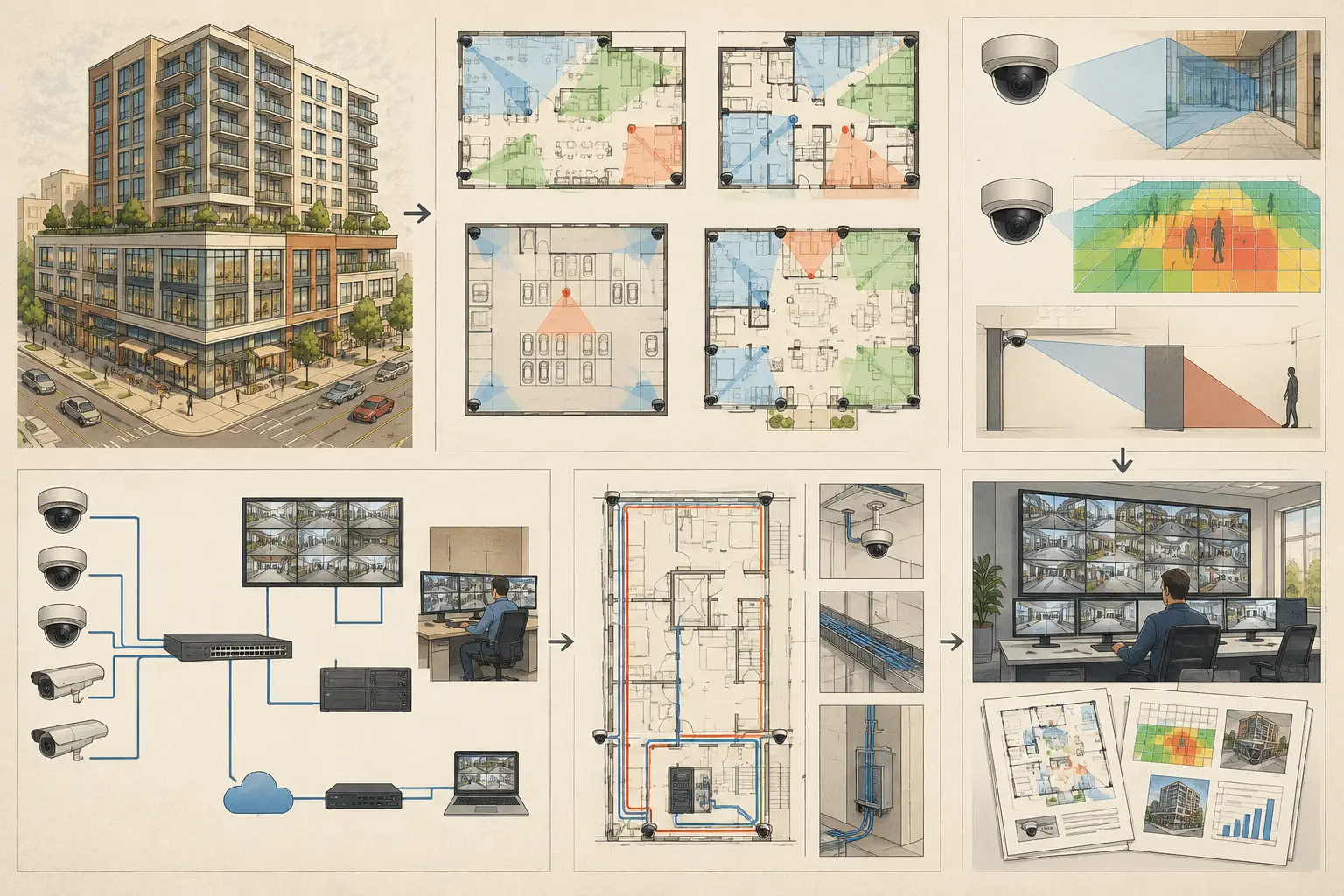
A mixed use CCTV project example is rarely a matter of placing cameras at every door. A single development can combine public retail frontage, controlled office floors, residential access, loading activity, parking, and shared circulation. Each area has different users, operating hours, risk conditions, privacy constraints, and evidential requirements. The design challenge is to translate those differences into verified camera positions, fields of view, pixel-density targets, network paths, and a deliverable that every project stakeholder can review.
This practical example follows a hypothetical six-story mixed-use building. The ground floor contains retail units and a shared lobby; floors two through five are offices; the sixth floor has residential amenity space and plant rooms. A basement garage, loading bay, and external pedestrian approaches complete the site. The purpose is not to prescribe a universal camera count. It is to show how a disciplined design workflow turns a complicated brief into traceable engineering decisions.
Define the mixed use CCTV project example by zone
The first input is a zone schedule, not a camera schedule. Assigning camera quantities before defining objectives often creates broad overview coverage with insufficient detail at the points where identification, recognition, or operational verification is required.
For this example, the security team separates the development into public, semi-public, restricted, and service zones. Public zones include retail approaches, the shared entrance, and visitor lobby. Semi-public zones include elevator lobbies and office corridors. Restricted zones include office tenant entrances, plant access, management areas, and the loading bay. The basement requires its own treatment because vehicle movement, pedestrian routes, ramps, payment equipment, and emergency exits have different viewing conditions.
Each zone should state what the camera is expected to support. An entrance camera may need identification-level detail at the threshold, while a parking overview may be intended for monitoring vehicle movement and incident context. These are different design objectives. A wide field of view can provide useful situational awareness but may not provide sufficient pixel density for facial identification at the far edge.
A concise design basis for the example might define identification coverage at the main shared entrance and controlled tenant doors, recognition or observation coverage in circulation routes, and general monitoring coverage across parking aisles and loading operations. The specific PPM requirement and DORI interpretation should be agreed with the client, consultant, or relevant project specification. Calculated values are design outputs, not proof of actual installed performance.
Start with calibrated geometry, not a marked-up image
Import the architectural plans and calibrate scale using a known drawing dimension. This step affects every subsequent output: camera distance, field-of-view width, mounting height interpretation, DORI calculations, cable estimates, and report diagrams. If the floor plan scale is wrong, an apparently detailed coverage drawing can still be technically unreliable.
In this mixed-use building, each level is modeled separately, with the basement and site plan treated as distinct environments. Review walls, glazing, columns, doors, counters, elevator cores, shelving zones, and service-room partitions. These physical elements determine what the camera can actually see. A camera cone drawn across a wall may look acceptable on a presentation plan, but it does not represent a usable line of sight.
The retail perimeter illustrates a common coordination issue. Early tenant layouts may be incomplete, so permanent shelving and point-of-sale locations are not yet known. Rather than pretending this uncertainty does not exist, the design should mark the assumptions and identify areas requiring tenant-fit-out review. Security design is often iterative, especially where architecture and operations are still changing.
Establish mounting assumptions
The main lobby has a higher ceiling than the office corridors, while the garage has exposed services and lower clearance around vehicle routes. Mounting height cannot be copied across these spaces without consequence. Increasing mounting height may expand visible floor area, but it also changes the viewing angle and can reduce facial detail at the target plane.
For every camera, record mounting height, direction, tilt, focal length, sensor size, and resolution. A corridor camera may use a different focal length from a lobby overview camera even if both use the same resolution. The useful question is not whether the camera model has a high megapixel number. It is whether its configured optics and position achieve the required pixel density where it matters.
Design coverage around decision points
The most valuable views in a mixed-use development often occur where people or vehicles transition between zones. In this example, those decision points include the public entrance, elevator doors, office reception boundaries, residential amenity access, vehicle ramp, loading-bay gate, and pedestrian exit from the garage.
At the main entrance, an overview camera can show approach direction, queue conditions, and activity around the doors. A second, tighter view may be needed to achieve the intended identification detail at the controlled entry line. Trying to make one wide-angle camera perform both jobs is a frequent compromise. It can work in a small vestibule, but only after DORI and field-of-view calculations confirm the target area is covered at the specified PPM.
The loading bay requires similar separation of functions. An overview camera can record vehicle positioning, dock activity, and door status. A targeted camera can cover the driver interaction point or goods-entry threshold. Camera placement must also account for truck bodies, open roller shutters, stacked pallets, and temporary equipment. These are real occlusion risks, not minor drawing details.
In the garage, a camera aimed along an aisle may provide effective contextual coverage but have blind spots behind columns or parked vehicles. Overlap between adjacent cameras can reduce these gaps and improve incident reconstruction, although overlap has a cost in equipment, bandwidth, storage, and review effort. The appropriate amount depends on the operational brief and the consequences of a missed view.
Review DORI, blind spots, and overlap
Once cameras are positioned, review the calculated field of view and pixel-density coverage on the calibrated plan. DORI is useful because it moves the discussion beyond a colored cone. It helps distinguish a camera that can detect a person from one that may support recognition or identification at a defined distance.
For the lobby entrance, check the DORI result at the access line rather than at the camera's center axis only. For the garage, inspect the far end of each aisle and the pedestrian paths beside vehicles. For office corridors, verify coverage at cross-corridor intersections and door approaches. The design review should identify where the intended performance level falls away, then decide whether to adjust focal length, mounting position, camera resolution, tilt, or the stated objective.
Do not treat calculated coverage as a substitute for a site survey. Reflections from glazing, low light, headlight glare, ceiling-mounted signage, landscaping growth, and later tenant changes can all affect field performance. A structured drawing makes these risks visible early, but qualified professionals should verify final installation conditions and project-specific requirements.
Coordinate the network before the camera count is fixed
Mixed-use projects often fail in coordination rather than camera selection. Retail, office, residential, and landlord systems may have separate responsibilities, network domains, comms rooms, or retention requirements. The design must establish where each camera connects, which switch serves it, how pathways reach the device, and where aggregation occurs.
In this example, the basement cameras route to a local telecom room because long horizontal cable runs to the main security room would exceed the planned copper channel strategy. The lobby and retail-common-area cameras connect to a ground-floor switch, while office-floor cameras are grouped by floor. This creates a network topology that is easier to document, test, and expand than a collection of ad hoc home runs.
Bandwidth and storage calculations should use the selected recording assumptions, including resolution, frame rate, compression settings, scene activity, retention target, and recording mode. Manufacturer-specific bitrate behavior and video-management-system settings can change actual results. Use the calculation to size the design and flag dependencies, then validate it during detailed system engineering.
Produce a deliverable people can build and review
A mixed-use CCTV drawing should show more than device symbols. The final package should connect the camera schedule to the plan view, including camera IDs, mounting information, direction, focal length, field of view, coverage purpose, calculated DORI or PPM results, and network connection reference. It should also identify assumptions, unresolved coordination items, and locations where field verification is required.
CCTV Design Tool Online supports this workflow in one persistent browser-based workspace: import and calibrate drawings, model relevant geometry, configure brand-agnostic camera parameters, review occlusions and coverage, plan connectivity, and generate structured technical reports. The benefit is traceability. When a lobby layout changes or a column is added in the garage, the team can review the effect on coverage instead of revising disconnected plans, spreadsheets, and report images by hand.
A useful closing question for any mixed-use design is simple: can the project team explain why each camera is there, what it is expected to see, and where its limitations begin? If the drawing and report answer that clearly, the design is ready for a more productive technical review.