A fence-line camera that can detect movement but cannot identify a person at the gate is not a minor design gap. It is a mismatch between operational intent and image detail. Effective perimeter camera planning begins by defining what must be seen, where it must be seen, and at what pixel density - before camera symbols are placed on a drawing.
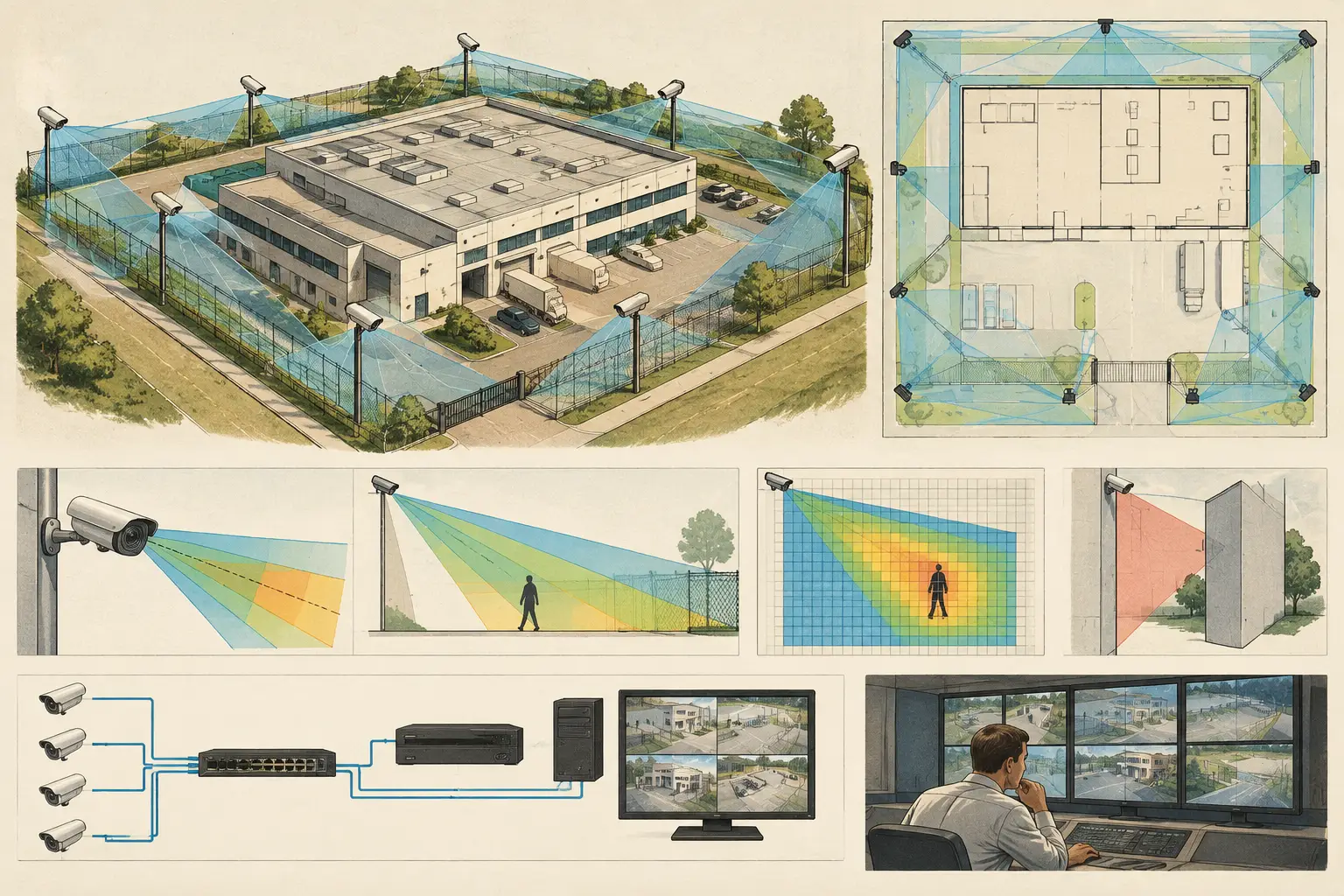
Perimeter systems are exposed to long sightlines, changing daylight, vegetation, vehicle traffic, uneven ground, and physical barriers. A credible design therefore combines field of view calculations with verified geometry, expected lighting conditions, network routes, and a practical installation review. Camera cones alone are not evidence of usable coverage.
Start With the Perimeter Security Objective
A perimeter is rarely one continuous security problem. A vehicle entrance, pedestrian gate, fence line, loading yard, service road, and building approach all have different risks and different evidential requirements. The first design input should be a zone-by-zone statement of purpose.
For example, a long outer fence may require detection and situational observation, while a pedestrian entrance may require recognition or identification depending on the project brief. A loading entrance may need overview coverage of vehicle movements plus a separate, tighter view of the driver or access-control interaction. Trying to achieve all of these outcomes with one wide-angle camera usually creates a coverage drawing that looks complete but provides insufficient pixel density at critical points.
DORI is useful here because it turns a general request such as “cover the boundary” into measurable design intent. Detection, observation, recognition, and identification are distinct levels of detail. The required pixels per meter, or PPM, should be agreed for each zone based on the project’s operational requirements. These are calculated design targets, not a guarantee that real-world footage will achieve a particular result under every lighting, weather, compression, or motion condition.
Build a Scaled Perimeter Model Before Placing Cameras
Perimeter accuracy depends on scale calibration. Import the latest site plan, confirm a known dimension from an approved drawing or site survey, and calibrate the model before calculating distances, fields of view, or PPM. A small scale error on a large site can materially alter a camera’s calculated coverage at the far end of a fence line.
The drawing should include more than the property boundary. Add walls, gates, buildings, guardhouses, retaining walls, loading structures, roads, landscaping, and known changes in elevation where available. A camera mounted beside a building can have an apparently clear field of view on a two-dimensional plan while a wall return, gate pillar, canopy, or parked trailer blocks the actual scene.
Treat openings and obstructions as geometry
Physical geometry should distinguish solid barriers from openings. A fence may allow partial visibility through mesh but still create practical problems through posts, glare, climbing vegetation, and changing shadow. A masonry wall is a full occlusion. A vehicle gate can be open, closed, or occupied by a vehicle. These conditions should be reviewed as design assumptions rather than ignored because they are difficult to represent.
Mounting height also affects the result. Raising a camera may improve sightlines over vehicles and reduce the chance of tampering, but it can reduce facial detail at a gate because of the viewing angle. A lower mounting position may improve identification at a controlled entrance while becoming more vulnerable to obstruction or deliberate interference. There is no universal “correct” height; the choice depends on the target, focal length, sensor size, tilt, and site constraints.
Select Optics From the Target Backward
A common perimeter design error is choosing a camera resolution first, then attempting to stretch its field of view across the site. Instead, start at the target area where a required DORI level must be achieved. Establish the target width, distance, and required PPM, then evaluate camera resolution, sensor size, and focal length together.
A wide field of view can provide context across a gate approach, but its pixel density falls as scene width increases. A narrower focal length can deliver more detail at distance, yet it may leave adjacent areas outside the frame and make tracking more difficult. This is why layered coverage is often more effective than forcing one device to perform every task.
At a main entrance, an overview camera may show vehicle approach, queueing, and lane use. A second camera, configured for the relevant target width, can provide the required image detail at the barrier, pedestrian route, or credential presentation point. Their functions should be stated separately in the camera schedule and report.
Review direction and tilt with the same discipline. Excessive downward tilt may reduce distant coverage. A shallow angle toward an entrance can create glare, poor facial capture, or a background that changes dramatically from day to night. Where possible, avoid aiming cameras directly into low sun positions, reflective surfaces, vehicle headlights, or unshielded security lighting.
Check Blind Spots, Overlap, and Continuity
Perimeter coverage should be assessed as a sequence, not as isolated camera views. The question is not only whether each camera has a valid field of view, but whether a person or vehicle can move between protected areas without being observed at the required level.
Coverage overlap is valuable at corners, gates, transitions between buildings and fences, and areas where one camera may be temporarily obstructed. However, overlap is not automatically beneficial. Excessive duplication can add cost, storage demand, and network load without improving the operational outcome. The best overlap is intentional: it supports tracking, provides a second angle at high-risk points, or maintains visibility if a gate, vehicle, or landscape feature blocks one view.
Walk the likely approach paths on the drawing. Consider both authorized and unauthorized movement: a visitor walking from parking, a vehicle entering through a service gate, or a person following the fence behind stored materials. Review camera fields of view against these paths, then inspect the calculated PPM bands rather than relying on the outer boundary of each cone.
For complex sites, CCTV Design Tool Online can keep calibrated drawings, camera specifications, wall occlusions, DORI calculations, and coverage views in one design workspace. The value is traceability: a reviewer can see the assumptions behind a camera position rather than interpreting disconnected markups and spreadsheets.
Plan for Night Conditions and Scene Change
Daytime coverage is only one design condition. Exterior scenes change with ambient light, headlights, weather, gate operation, and seasonal growth. Camera datasheets can indicate low-light capabilities, but manufacturer specifications must be reviewed for the selected model and do not replace site-specific testing.
Consider where lighting is positioned relative to the camera. Backlight from a gatehouse, headlights facing the lens, or floodlights aimed across the optical path can reduce usable detail. Infrared illumination can also be affected by reflective signs, fencing, rain, dust, and close objects that cause flare. A planned field of view should identify these risks early so that camera position, lighting design, or both can be adjusted.
Vegetation deserves particular attention. Shrubs and trees may not appear significant on an architectural plan, yet branches can obscure a view after seasonal growth or move continuously in wind. Document landscape-management assumptions where they affect surveillance performance. The security design cannot assume a sightline will remain clear without an operational process to maintain it.
Coordinate Power, Network, and Recording Requirements
A camera position is not fully planned until its connection path is understood. Perimeter cameras may require long cable routes, external cabinets, fiber uplinks, PoE extensions, surge protection, local power, or wireless links where cabling is impractical. Each choice introduces trade-offs in resilience, maintenance, bandwidth, and environmental protection.
Network topology should reflect actual camera quantities, estimated bit rates, switch locations, uplink capacity, and recording requirements. Bit rate depends on configured resolution, frame rate, compression, scene complexity, and camera features. Use planning values for design coordination, then validate final settings against the selected manufacturer equipment and the client’s recording policy.
External equipment also needs a practical environmental review. Confirm mounting structures, cabinet access, cable containment, grounding approach, service clearances, and the path from the camera to the nearest network point. These are installation and engineering matters that should be coordinated with qualified disciplines and applicable project requirements.
Produce a Reviewable Design Package
The final perimeter design should allow an installer, consultant, ICT team, and client representative to understand the same intent. At minimum, document the calibrated plan, camera locations, mounting assumptions, direction and tilt, focal length or lens setting, field-of-view dimensions, DORI or PPM results, blind-spot observations, overlap rationale, and network connection concept.
A camera schedule should state each camera’s role rather than merely assigning a number. “Observe north fence line” is clearer than “Camera 12.” Where a design depends on assumptions - such as clear vegetation, approved mounting height, or supplemental lighting - record them explicitly. This makes later revisions more controlled and supports meaningful site verification.
Perimeter camera planning is strongest when it remains open to challenge. Use calculations to establish a defensible design basis, then verify dimensions, obstructions, lighting, selected equipment, and final camera views during installation. That disciplined handoff is what turns a coverage drawing into a system that can be reviewed, built, and maintained with confidence.