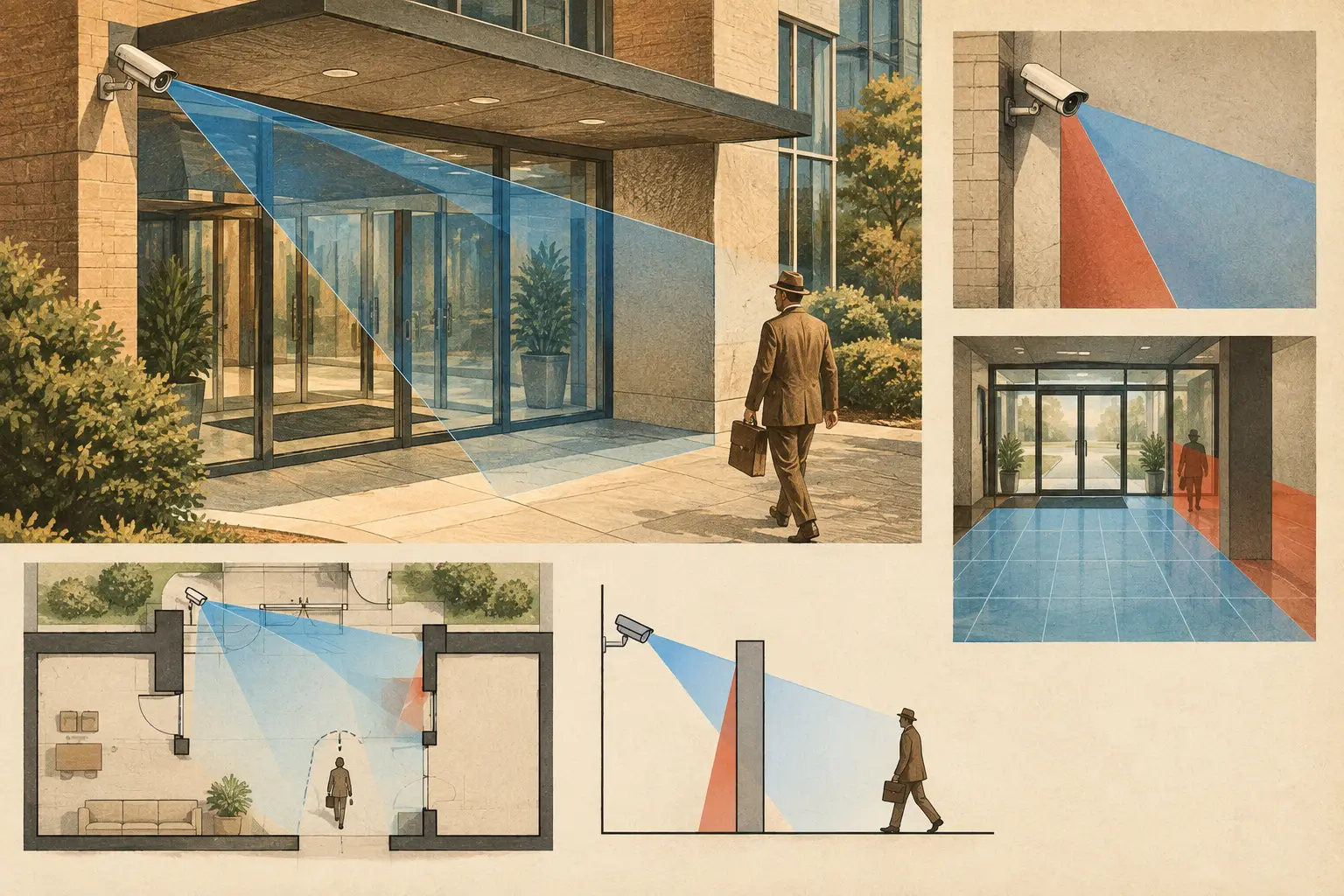
An entrance can sit inside a camera cone on a drawing and still produce weak operational coverage. That is the central reason why cameras miss entrances: a visible doorway is not necessarily a usable observation point. The camera may see movement near the door, while failing to deliver sufficient pixel density for identification, losing faces to backlight, or being blocked at the precise moment the door opens.
For security consultants, installers, and project reviewers, entrance coverage needs to be assessed as a changing three-dimensional scene rather than a symbol on a floor plan. The question is not simply, “Can the camera see the door?” It is: “Can the system capture the required subject, at the required quality, across the expected approach and passage path?”
Why Cameras Miss Entrances: The Design Gap
Entrances are difficult because they combine several design variables in a small area. People approach at different angles, doors move, exterior and interior light levels can differ sharply, and architectural features such as canopies, columns, glazing, access-control readers, and revolving doors alter sightlines.
A wide-angle camera mounted above a lobby may show the whole entrance zone. However, its field of view may spread available pixels across too much scene width. At the threshold, the resulting PPM may support general monitoring but not facial identification. A second camera with a narrower focal length may be needed to cover the identification plane, while the wider camera provides context and tracks direction of travel.
This is not necessarily a case for adding cameras everywhere. It is a case for defining the operational objective first. Detection, observation, recognition, and identification require different image detail. DORI-based planning provides a useful framework, but required pixel density should also be aligned with the project brief, risk assessment, and the actual task expected of operators or investigators.
Start With the Entrance Scenario, Not the Camera Position
Before selecting a mounting point, document how the entrance is used. A main employee entrance at 8:30 a.m. behaves differently from a loading-bay personnel door, an emergency exit, or a public reception door. The design must account for the normal direction of travel, tailgating risk, visitor processing, access-control interactions, and whether people pause at the threshold.
Define one or more target planes. For example, a face-capture plane may be located just inside the door where subjects naturally slow down. A second zone may cover the approach from the exterior. If a turnstile, intercom, or card reader controls the entrance, the relevant subject position may be beside the door rather than centered within it.
This step prevents a common error: aiming a camera at the architectural centerline of a doorway even though people approach from one side, look down at a credential reader, or are obscured by a door leaf. The best viewpoint often follows the human path, not the building geometry.
Check pixel density at the target plane
A camera specification alone does not establish performance. Resolution, sensor size, focal length, camera distance, and field of view interact to determine pixel density at a specific location. A high-resolution camera with a very wide field of view can still provide insufficient pixels on a face at the entrance.
Calculate PPM across the actual face-capture or transaction zone, not only at the center of the camera view. Edge areas may have lower practical quality because of lens distortion, compression, motion blur, and lighting variation. Calculated PPM is a design input, while installed image performance must be verified during commissioning with the selected camera, lens, encoding settings, and scene conditions.
Geometry Creates Occlusion That 2D Drawings Can Hide
Many entrance failures originate in drawings that treat walls as lines and cameras as flat cones. In reality, walls have thickness, door leaves sweep through space, soffits extend downward, and decorative features interrupt sightlines.
A camera placed directly opposite a single door can lose the subject when the opened leaf sits between the lens and the person. The same issue occurs with outward-opening doors, glass vestibules, elevator lobby doors, and access gates. Depending on the camera angle, the opening door may block the most important moment: the person entering or leaving.
Mounting height and tilt also matter. A high ceiling mount can clear furniture and pedestrian traffic, but an excessively steep downward angle often captures the top of a head instead of usable facial detail. A lower, more level view may improve face capture but can introduce tampering risk, glare, or a new occlusion from signage. There is no universal mounting height. The appropriate height depends on the entrance geometry, required target detail, available fixing points, and environmental constraints.
Model open doors and physical obstructions
Review both the closed and open positions of every nearby door. Include fixed obstructions such as mullions, columns, canopies, reception desks, planters, signs, queue barriers, and fire-rated partitions. Where a 3D model is not available, a disciplined floor-plan review should still show door swing arcs, wall thickness, and approximate mounting elevations.
A useful test is to trace the sightline from the camera to a person standing at the target plane. Then repeat the test at the left and right edges of that plane, with the door open and with typical furniture or queue arrangements in place. Small offsets in camera position can remove an occlusion that would otherwise persist through the life of the installation.
Lighting Can Defeat a Correct Field of View
Entrances routinely contain difficult lighting transitions. Exterior daylight behind a subject can create silhouette images. Glass façades produce reflections. At night, bright external lighting or vehicle headlights can influence exposure. Inside, a dark lobby may sit immediately behind a bright glazed door.
A camera may technically cover the entrance but be unable to render usable face detail across the expected range of conditions. Wide dynamic range settings, shutter configuration, supplemental lighting, and camera orientation can improve results, but each involves trade-offs. A faster shutter can help reduce motion blur, for example, while requiring adequate light and potentially increasing image noise.
Do not assume that an image viewed on a laptop during daytime design review represents nighttime or backlit performance. Review lighting intent with the electrical and architectural teams, then perform site verification during representative operating conditions. For sites with long seasonal daylight variation, more than one lighting condition may need to be assessed.
Coverage Overlap Is Useful When It Has a Purpose
Overlapping cameras are sometimes dismissed as duplication. At entrances, purposeful overlap can create resilience and improve evidential context. One camera may provide a frontal identification view, while another records the wider approach, companion movement, or the direction a person takes after entry.
The overlap should be planned, not accidental. If two cameras see the same doorway from nearly identical angles, they may share the same glare problem and the same door-leaf occlusion. Different viewpoints reduce common failure modes. They can also assist operators in following a subject through the entrance without placing an excessive identification requirement on a single wide scene camera.
Network topology and retention design should be considered at the same stage. Adding higher-resolution cameras or increasing frame rate at busy entrances affects bandwidth, switch capacity, storage, and recording settings. The best optical design must still be supportable by the wider system architecture.
A Practical Review Workflow for Entrance Coverage
Import and calibrate the floor plan before making optical judgments. A scale error changes estimated camera distances, field of view dimensions, PPM calculations, and the apparent relationship between a camera and a door. Confirm dimensions against reliable architectural references where available.
Next, establish the required observation tasks and target planes. Position candidate cameras using verified or proposed parameters for resolution, sensor size, focal length, mounting height, direction, and tilt. Review DORI and pixel-density results at each target plane, then inspect blind spots and coverage overlap in the surrounding approach paths.
Finally, document assumptions that require field confirmation. These may include final ceiling elevations, door handing, lighting levels, selected camera model, lens selection, codec configuration, and expected furniture layout. CCTV Design Tool Online can keep geometry, camera parameters, coverage analysis, network planning, and reporting in one design workspace, but calculated results remain dependent on the accuracy of the input drawing and specifications.
Treat Entrance Coverage as a Commissioning Item
The installed system should be tested with people walking naturally through the entrance, not only with a static technician standing under the camera. Test both directions of travel, normal and open-door states, expected lighting conditions, and realistic walking speed. Review whether the recorded image meets the stated operational objective at the target plane.
Where results fall short, adjustment may involve camera direction, tilt, focal length, exposure settings, supplemental lighting, or a second viewpoint. The right corrective action depends on the root cause. Replacing a camera with a higher-resolution model will not solve a door-leaf occlusion, while moving a camera will not correct severe backlighting on its own.
An entrance is a controlled transition point, not just another area on a floor plan. Designing it around target detail, physical geometry, changing light, and real movement gives the project team a far better basis for installation review and acceptance testing.